
Rubrik Zero Labs recently identified and analyzed Azalea RAT, a malware-as-a-service (MaaS) offering that was recently advertised on underground cybercrime forums. Promoted as a modular malware platform with a broad set of post-compromise capabilities, Azalea RAT combines remote administration, stealth mechanisms, privilege escalation, persistence, information theft, and an extensible plugin architecture. This report presents a comprehensive technical analysis of the malware, detailing its architecture, execution flow, evasion techniques, and operational capabilities to provide defenders with insights into its tradecraft and opportunities for detection.
Initial Infection
The infection begins with a malicious Windows shortcut named пропозиція.pdf.lnk. When opened, the shortcut launches cmd.exe, which uses the native Windows curl utility to retrieve the next-stage payload from hxxp://159.100.18.98:80/fbbef44e-51f2-4f0c-be82-09a32ddbb320. The payload is saved as %TEMP%\zydrnobipiw.exe and executed in the background using start /b.
First Stage Loader
After the LNK downloads and launches %TEMP%\zydrnobipiw.exe, the malware decrypts a small embedded data block containing the filename main_1.pdf. It creates this empty decoy file under %LOCALAPPDATA%\Temp and opens the location using explorer.exe. This activity likely serves as a distraction and maintains the appearance of a PDF-related operation while the malware decrypts, unpacks, and loads its actual payload directly into memory.
Anti-Analysis and Sandbox Evasion
Before decrypting and loading its actual payload, the malware performs three checks to determine whether it is running on a normal Windows system. If any check fails, it enters a long computational delay intended to exhaust the observation period of automated sandboxes.
Memory Pressure Check
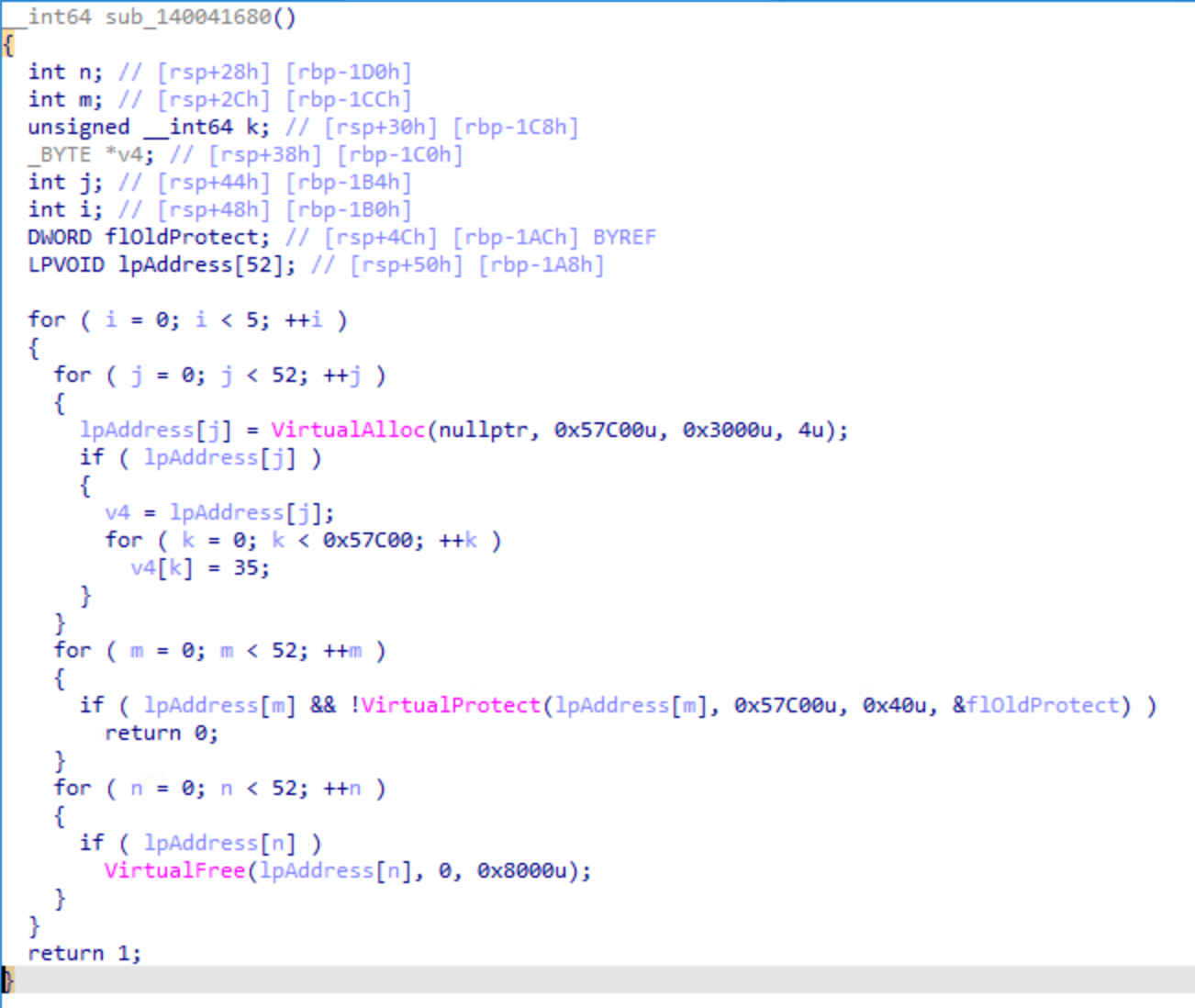
The malware performs five rounds of memory activity. In each round, it allocates 52 regions of approximately 351 KB, fills them with data, changes their permissions to executable and writable, and then releases them.
This produces about 18 MB of simultaneous memory pressure per round. A failure during allocation or permission changes may indicate a resource-constrained sandbox.
Sleep-Timing Check
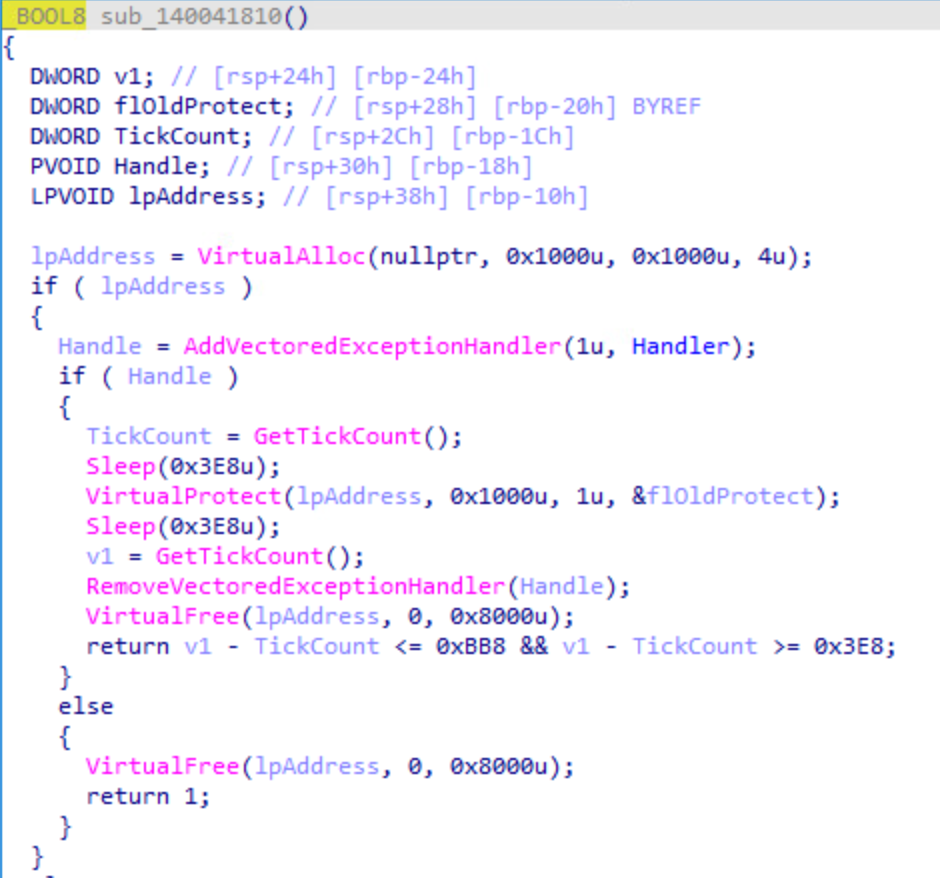
The malware measures the elapsed time across two one-second sleep calls using GetTickCount and expects the total duration to fall between one and three seconds. During the check, it changes an allocated memory page to PAGE_NOACCESS before measuring the elapsed time. The routine is intended to identify analysis environments that accelerate sleep calls or introduce significant execution delays.
High-Resolution Timing Check
The malware performs an additional timing check using QueryPerformanceCounter, which provides a high-resolution time source. It measures the elapsed time across two one-second sleep calls and expects the total duration to fall between one and three seconds. Performing the same validation with a high-resolution timer allows the malware to verify that the observed delay is consistent, helping detect environments that accelerate sleep calls or manipulate timing behavior.
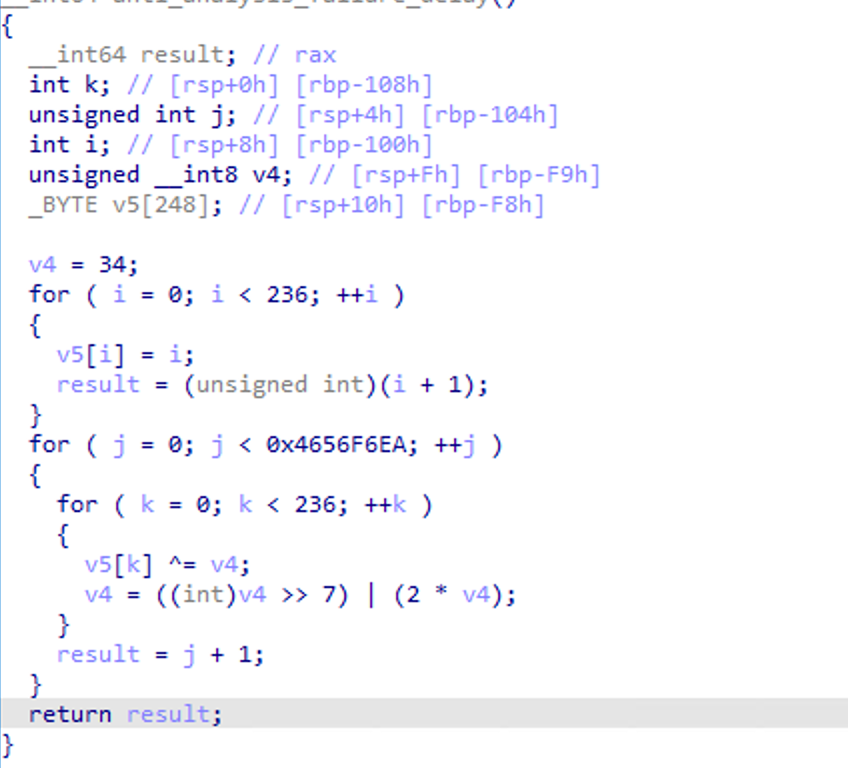
If any of the preceding checks fails, the malware enters a computationally expensive nested loop before continuing to payload processing. The routine repeatedly modifies a buffer through a very large number of iterations, consuming CPU resources and significantly delaying subsequent malicious activity. This behavior appears designed to hinder automated analysis, as short-lived sandboxes may terminate execution before the malware decrypts and runs its next-stage payload.
Payload Decryption and Execution
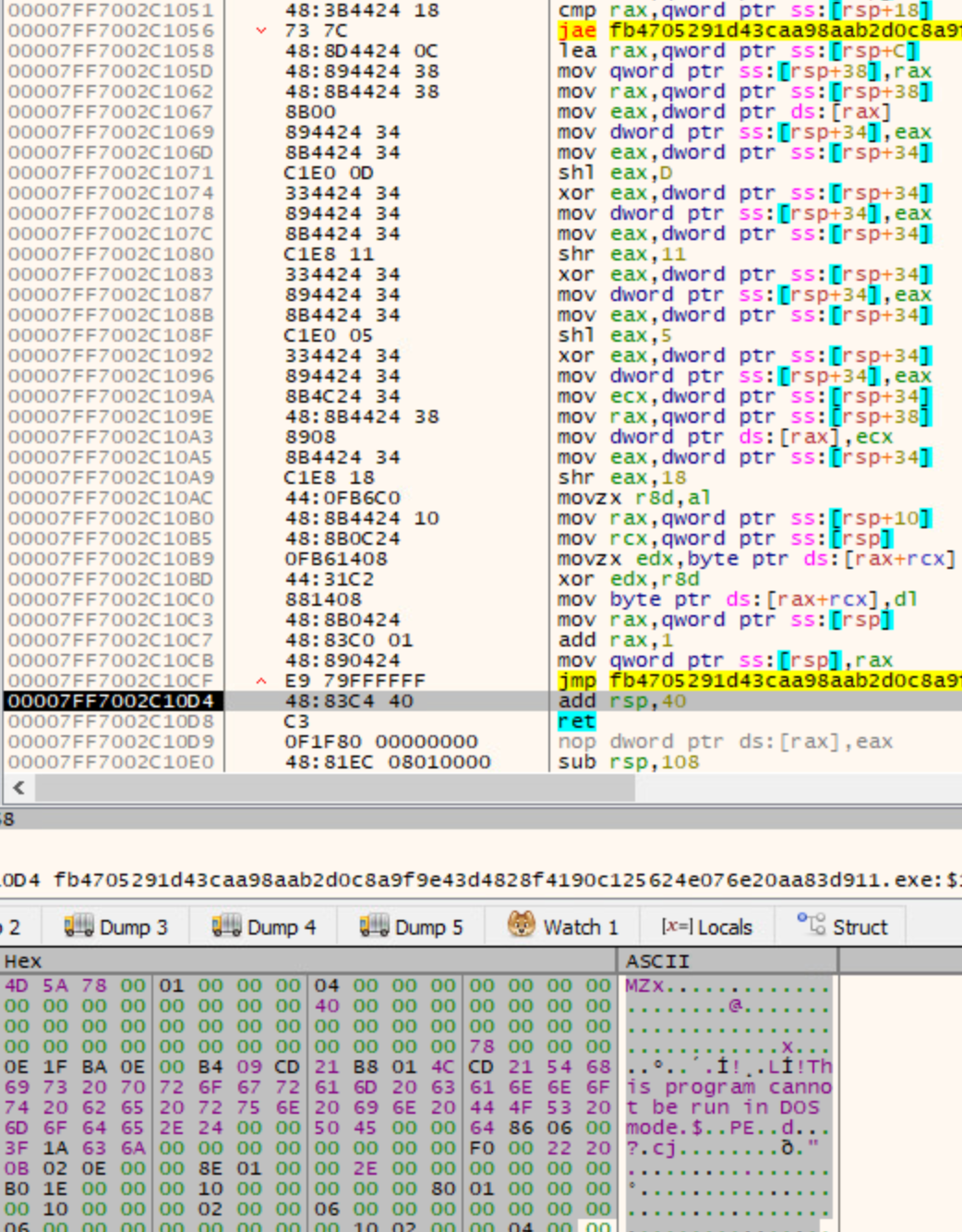
The malware stores its embedded payload in encrypted form and surrounds it with large amounts of random padding to conceal the real content. The loader first removes this padded data and reconstructs the original payload buffer. It then decrypts the reconstructed content using a lightweight XOR-based routine. Once decrypted, the data reveals a Windows PE file, which is loaded and executed directly in memory without being written to disk.
Second-Stage Loader
The second-stage DLL begins by creating a dedicated worker thread that is responsible for retrieving, preparing, and executing the next-stage payload. As one of its first actions, the thread uses Windows Management Instrumentation (WMI) to modify Microsoft Defender's configuration by invoking the MSFT_MpPreference class and adding the malware's working directory to the Defender exclusion list.
After establishing the exclusion, the worker thread checks the registry key HKCU\Software\Microsoft\Windows\CurrentVersion\DefaultAppPool for a GUID-named REG_BINARY value containing a previously downloaded encrypted payload.If a valid registry value is found, the malware proceeds directly to the unpacking and decryption stage without contacting its command-and-control infrastructure.
If the registry value is missing, the worker thread establishes an HTTPS connection using the WinHTTP API and issues a GET request to hxxps://13.57.6.116:443/babe8d03-0088-4c34-b80d-6dc46f139d36. The encrypted response is downloaded into a dynamically allocated memory buffer and subsequently stored in the same registry location as a GUID-named REG_BINARY value.
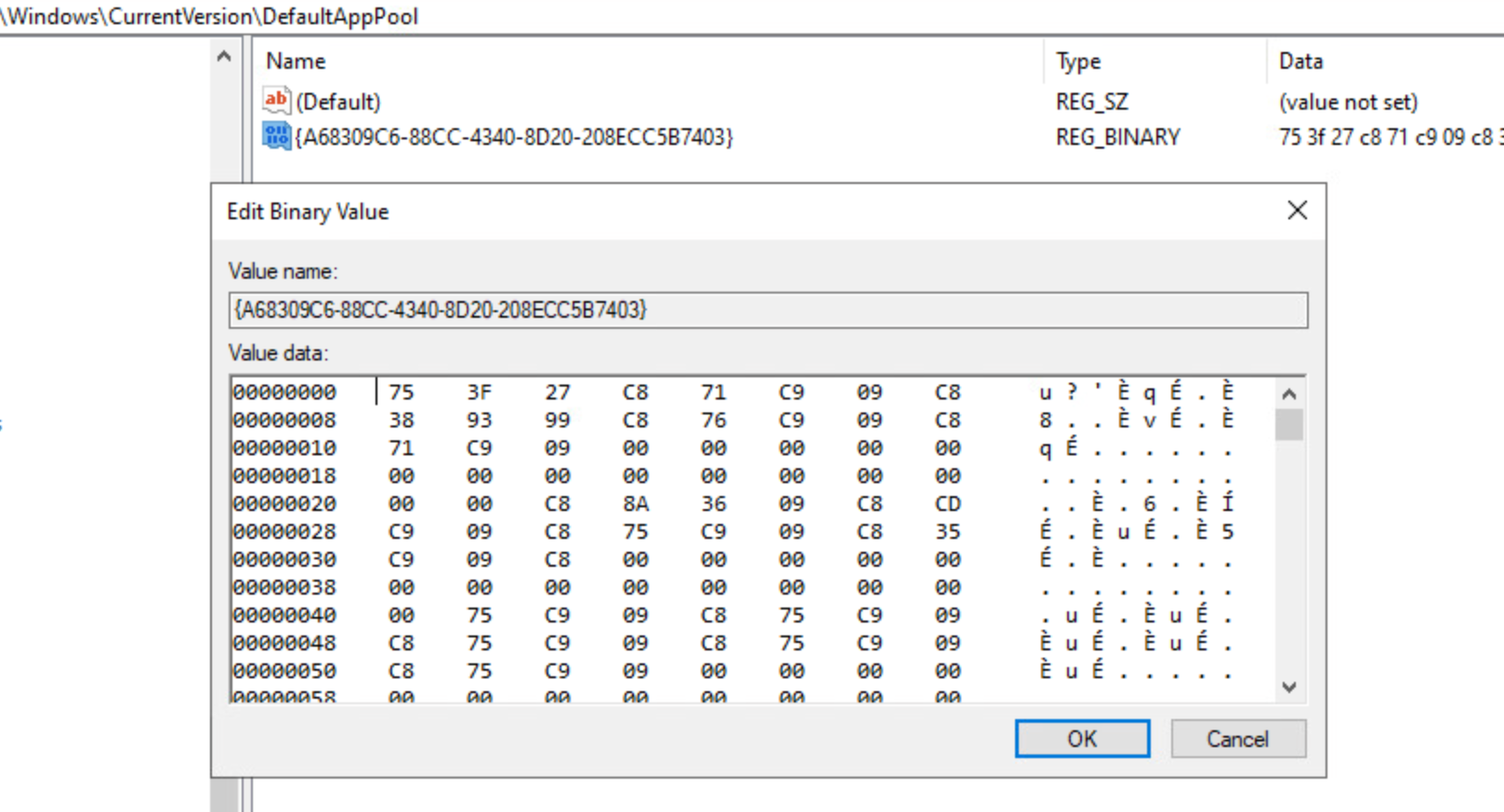
Once the encrypted data is available, either from the registry or from the remote server, the malware removes the random padding embedded within the package, reconstructs the original payload, and decrypts it using the repeating four-byte XOR key.
After validating the reconstructed package and verifying its internal structure, it loads the resulting .NET assembly directly into memory using the Common Language Runtime (CLR). The assembly is never written to disk as a standalone executable. Instead, the malware creates an in-memory byte array, loads the assembly into the current application domain, and invokes its managed entry point with the required arguments.
Process Injection
The malware also implements an alternative execution path based on remote process injection. In this routine, it launches RuntimeBroker.exe, allocates executable memory inside the process using VirtualAllocEx, copies a native PE payload into the allocated memory with WriteProcessMemory, and starts execution using CreateRemoteThread.
RPC Based UAC Bypass
The malware also contains an RPC-based UAC bypass routine that uses an internal Windows RPC interface together with the native debugging subsystem. It first launches winver.exe as a temporary helper process and retrieves its debug object.
The malware then preserves this debug object while launching ComputerDefaults.exe. After obtaining a handle to the new process, it uses ComputerDefaults.exe as the parent process for the next-stage payload. This technique is intended to execute the payload with elevated privileges without displaying the standard UAC prompt.
Azalea RAT
The final payload recovered from the infection chain is Azalea Agent, a feature-rich .NET remote-access trojan designed to provide persistent and interactive control over compromised Windows systems. Once executed, the RAT allows an operator to manage the infected host, execute commands and additional payloads, collect sensitive information, manipulate system resources, and maintain remote access through an extensive command-and-control framework. The analyzed build contains 87 built-in command handlers, including several capabilities intended for use in Windows environments.
Runtime Initialization
Upon execution, Azalea prepares its runtime environment by suppressing console output and certain Windows error dialogs, configuring process DPI awareness, registering exception and process-exit cleanup handlers, and enabling several SSL/TLS protocol versions for .NET network communication. It also handles special startup modes, including a COM-based elevation helper, and may relaunch itself without a visible window under specific conditions. After completing these initialization steps, the malware loads its configuration and initializes the components required for further execution.
Embedded String Table Decryption
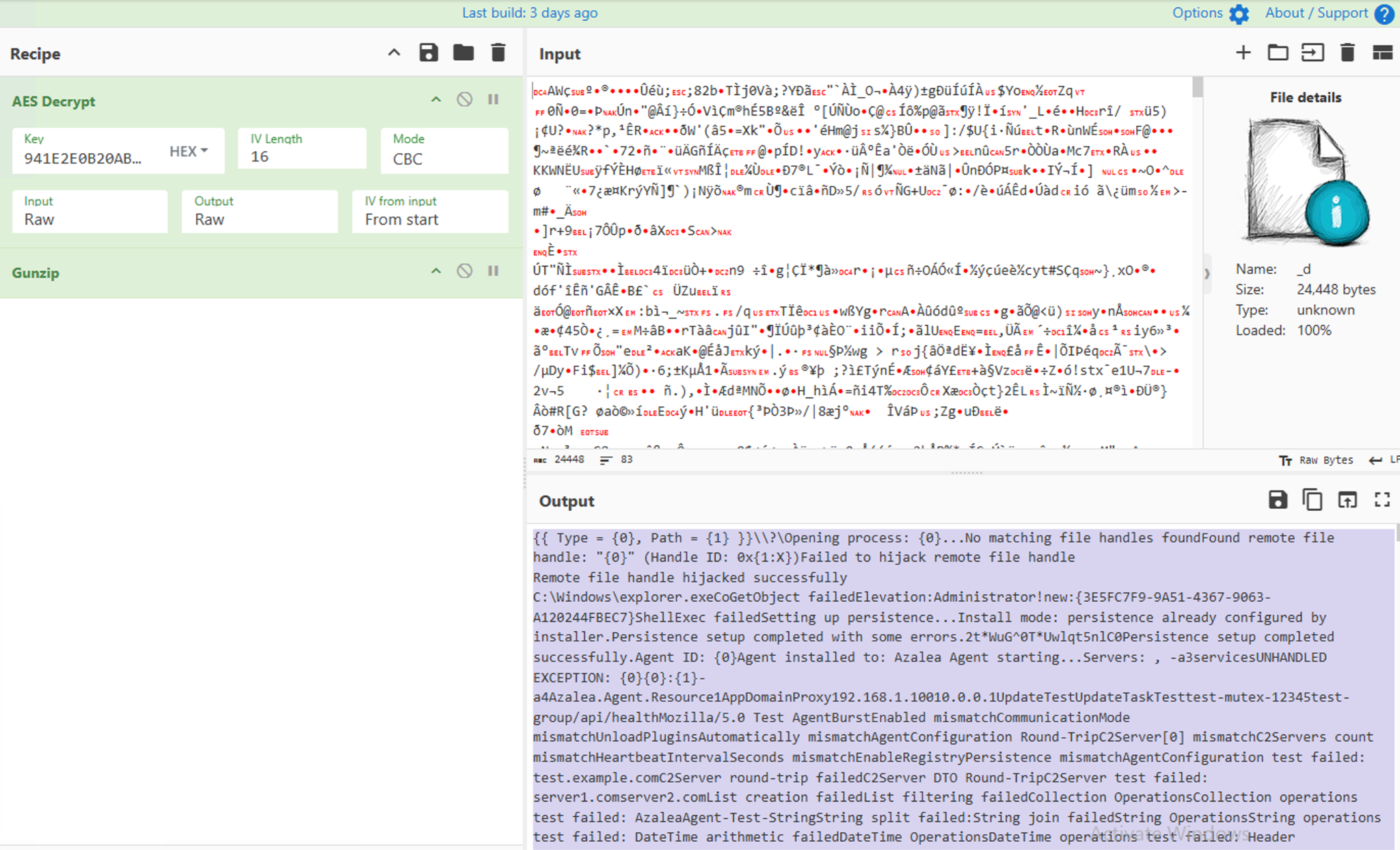
Azalea stores its encrypted runtime string table as embedded resources within the final .NET RAT assembly. The resource named _d contains the encrypted string data, while _e contains the 32-byte AES-256 key. During startup, the malware reads both resources directly from the assembly. It uses the first 16 bytes of _d as the initialization vector and decrypts the remaining data with AES-256-CBC. The decrypted output is then decompressed with GZip to recover the plaintext string table used throughout the RAT.
The recovered strings are not the malware configuration. Instead, they provide the runtime strings required by the implant, including installation and persistence messages, process and file operation strings, Registry paths, HTTP beaconing parameters, plugin management routines, remote desktop functionality, SOCKS5 proxy support, AMSI bypass messages, process injection routines, and numerous debug and error messages. Rather than storing these strings in plaintext within the binary, Azalea decrypts them during startup and retrieves them whenever required, making static analysis significantly more difficult.
Loading the Embedded MsgPack Library
After initializing the runtime string table, Azalea loads its embedded configuration. The configuration is stored within the final .NET RAT assembly as a Base64-encoded MessagePack blob. To deserialize it, the malware requires MsgPack.dll, which is also stored inside the assembly rather than shipped as a separate file.
During startup, Azalea reads the protected gGsIhf1Hog6AoKj2F7.STxi9BMJ3QrwFInRQ3 resource from the assembly and reconstructs MsgPack.dll using a custom .NET Reactor-style rolling decryption routine followed by Deflate decompression. The recovered library is then loaded directly into memory using Assembly.Load().
Azalea uses the in-memory MsgPack.dll assembly to deserialize the Base64-decoded configuration. Once loaded, the configuration provides the malware with its C2 servers, communication settings, installation and persistence options, plugin configuration, and other parameters required for execution.
Configuration Analysis
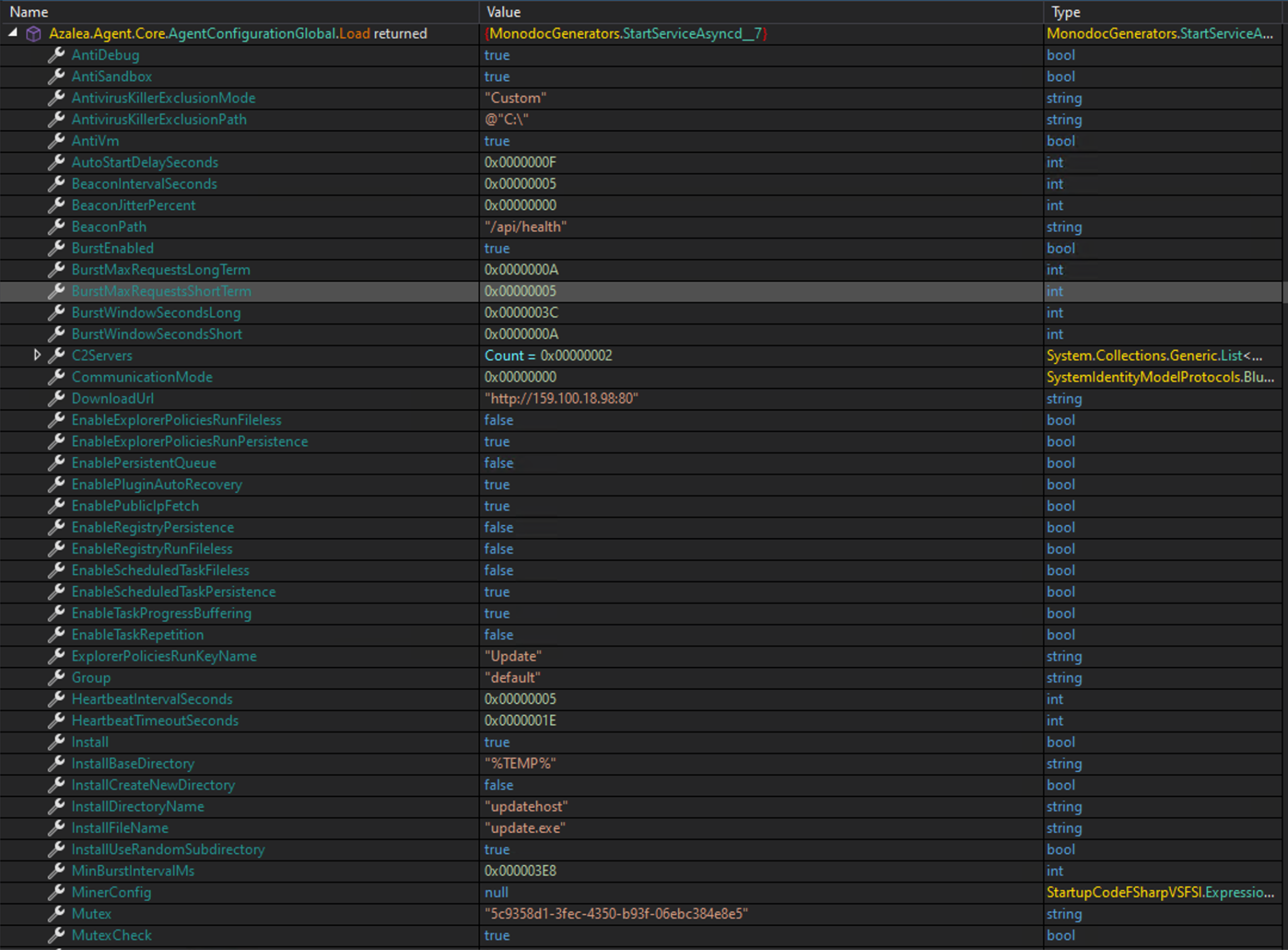
Once the embedded MsgPack.dll library is loaded, Azalea deserializes its Base64-encoded MessagePack configuration. The configuration acts as the central control point for the implant and defines its command-and-control servers, communication behavior, installation settings, persistence options, anti-analysis checks, plugin management, and runtime feature selection.
As shown in Figure 7, the configuration includes two command-and-control servers, a download URL, the /api/health beacon path, beacon and heartbeat intervals, reconnect timing, TLS usage, TCP keep-alive settings, and an HTTP User-Agent. It also defines the installation directory and filename, scheduled-task and Explorer Policies Run persistence, mutex checking, anti-debugging, anti-sandbox, and anti-virtual machine checks.
The configuration further controls plugin health monitoring, recovery attempts, task buffering, and automatic module startup. In the analyzed sample, the keylogger, information stealer, and cryptocurrency clipper are configured to start automatically. The miner, event log hook, antivirus exclusion module, AMSI patching, and UAC bypass options are set to false in this configuration.
AMSI Patching
Azalea includes support for bypassing the Windows Antimalware Scan Interface (AMSI) to reduce the likelihood of its payloads being inspected by security products. This functionality is controlled by the PatchAmsiScanBuffer configuration option and is executed only when the option is enabled.
When invoked, the malware loads amsi.dll, locates the AmsiScanBuffer function, and overwrites its initial instructions with a small patch. The patch forces AmsiScanBuffer to immediately return the error code 0x80070057 (E_INVALIDARG) instead of executing its normal scanning logic. As a result, AMSI does not inspect the supplied content before the function returns.
Single-Instance Enforcement
Before continuing execution, Azalea attempts to create the mutex 5c9358d1-3fec-4350-b93f-06ebc384e8e5, as specified in its embedded configuration. If the mutex is created successfully, the malware continues initialization and starts a local named-pipe server using the same identifier.
If the mutex already exists, indicating that another Azalea instance is active, the newly launched process connects to the existing instance through the named pipe and exchanges version and integrity-level information. The analyzed implant identifies itself as version 1.19.1.
Azalea compares the version and privilege level of both instances to decide which one should continue running. If the new instance has higher priority, it shuts down the existing process and takes over. This helps ensure that only one Azalea instance remains active.
Anti-Debugging Checks
Azalea performs several anti-debugging checks during startup. These include .NET and Windows API checks, direct inspection of the Process Environment Block, and queries for process debug flags, debug ports, and debug-object handles. If any of these checks detects a debugger, the malware immediately terminates itself.
Anti-Sandbox Checks
Sleep-Based Sandbox Detection
Azalea uses a timing-based check to detect sandboxes that shorten or skip long sleep periods. It starts a worker thread that sleeps for one hour and terminates the process after waking. Meanwhile, the main thread repeatedly calculates the SHA-256 hash of the same randomly generated 16-character string 100,000 times.
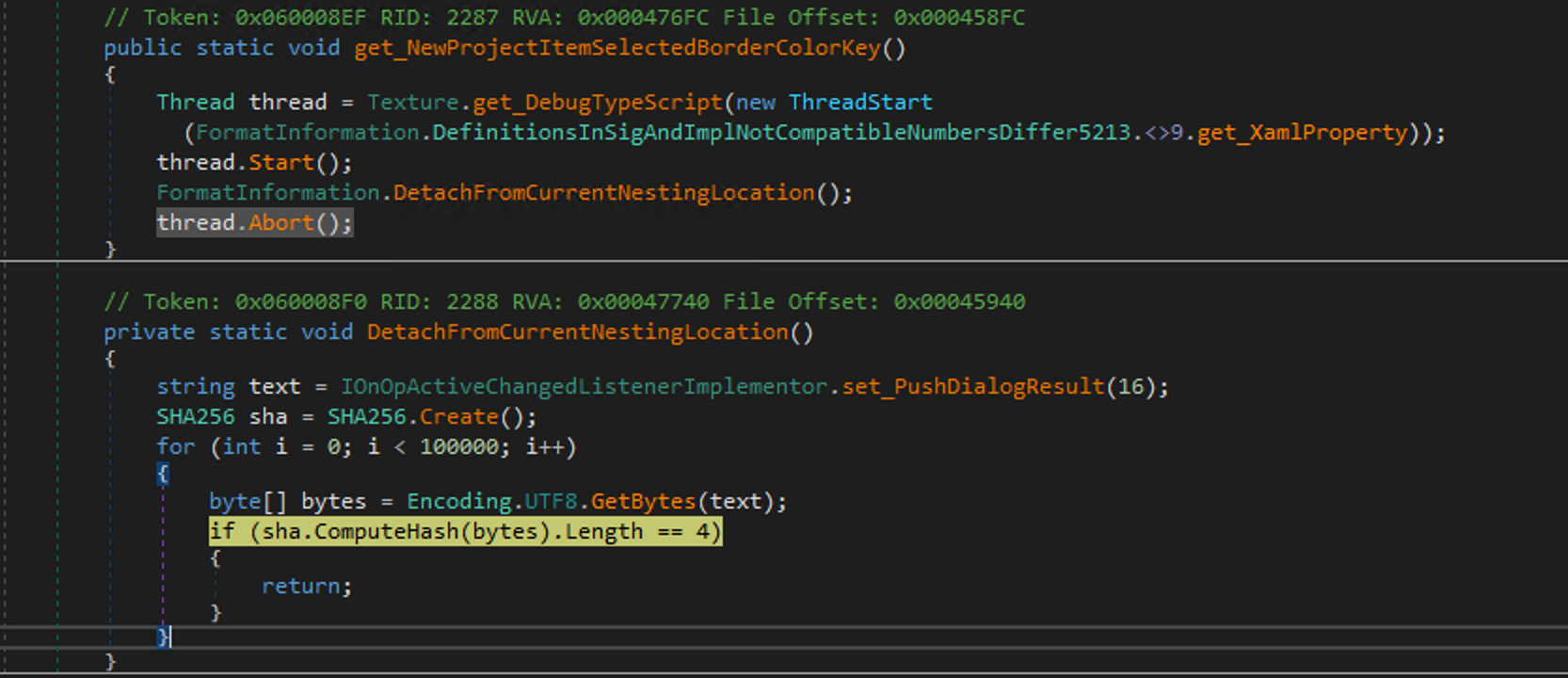
On a normal system, the hashing loop completes before the one-hour delay expires, allowing Azalea to abort the sleeping worker thread and continue execution. If a sandbox accelerates or skips the sleep, the worker thread wakes early and terminates the malware before the hashing loop finishes.
Azalea also performs several anti-sandbox checks when the AntiSandbox configuration option is enabled. It searches the Windows Registry for virtual disk identifiers such as DADY HARDDISK and QEMU HARDDISK, checks whether known sandbox-monitoring modules including SbieDll.dll, cmdvrt32.dll, cmdvrt64.dll, SxIn.dll, and cuckoomon.dll are loaded, and compares the current username against a list of commonly used analysis accounts.
If any of these indicators are detected, Azalea treats the system as a sandbox or malware-analysis environment and immediately terminates its process.
Anti-VM Checks
The RAT performs the following anti-VM checks on the victim’s machine:
- Searches the Windows system directory for QEMU-related files such as qemu-ga and qemuwmi.
- Searches for Parallels Tools files such as prl_sf, prl_tg, and prl_eth.
- Examines BIOS Registry values and WMI information for VMware, VirtualBox, VBOX, Innotek.
- Searches the System32\drivers directory for virtual-machine drivers such as balloon.sys, netkvm.sys, vioinput, viofs.sys, and vioser.sys.
- Enumerates running processes for virtualization-related services such as vboxservice, VGAuthService, vmusrvc, and qemu-ga.
- Checks known Cuckoo, VMware, and VirtualBox named pipes and device paths.
- Searches BIOS, firmware, SMBIOS, ACPI, and display-driver information for strings such as virtual, hyper-v, vmware, vbox, and innotek.
If any of these indicators is detected, Azalea treats the system as a virtualized or analysis environment and terminates its process.
Agent ID Generation
Azalea generates a stable identifier for each infected system by combining the configured mutex, the victim’s computer name, and the fixed string. It calculates the SHA-256 hash of this value, takes the first 16 bytes, and converts them into a GUID. This allows the command-and-control server to consistently identify the same victim across multiple executions.

Installation
Azalea retrieves its executable payload from the embedded resource 5a6b6179166849669814fc1f13d7b7e7. The resource is compressed with Deflate, and the malware uses DeflateStream to decompress it in memory and recover the embedded PE file.
The installation location is controlled by the embedded configuration. If InstallCreateNewDirectory is enabled, Azalea creates a new directory under the configured base path, using either the configured directory name or a randomized name.
If InstallUseRandomSubdirectory is enabled instead, it enumerates existing subdirectories, randomly selects one, and writes the payload there. In the analyzed configuration, Azalea selects an existing subdirectory under the user’s temporary directory and saves the recovered payload as update.exe, retrying with another directory if the write fails. After the payload is written successfully, the malware launches the dropped update.exe to continue execution.
Persistence
After writing the payload to disk as update.exe, Azalea applies the persistence methods enabled in its configuration. It supports the standard Registry Run key at HKEY_LOCAL_MACHINE\Software\Microsoft\Windows\CurrentVersion\Run, with a fallback to HKEY_CURRENT_USER\Software\Microsoft\Windows\CurrentVersion\Run, the Explorer Policies Run key at HKEY_CURRENT_USER\Software\Microsoft\Windows\CurrentVersion\Policies\Explorer\Run, and a scheduled task named UpdateTask. Each method is configured to execute the previously dropped update.exe payload.
COM-Based UAC Bypass
When the installation routine does not return a payload path, Azalea evaluates its UAC bypass logic. If the UacBypass option is enabled, it obtains the current Windows identity and uses WindowsPrincipal.IsInRole to determine whether the process is already running with administrator privileges. If the process is not elevated, Azalea reads the ConsentPromptBehaviorAdmin value from HKEY_LOCAL_MACHINE\SOFTWARE\Microsoft\Windows\CurrentVersion\Policies\System. When the value is not 2, the malware launches a hidden copy of itself with the special command-line parameters -a1, followed by the path to the executable that should be elevated and any command-line arguments to be passed to that executable.
The newly started process begins execution from its entry point, detects the -a1 parameter during startup, and invokes the COM-based UAC bypass routine. The routine initializes COM, temporarily masquerades the process as C:\Windows\explorer.exe, obtains an elevated COM object using the Elevation:Administrator moniker through CoGetObject, and finally invokes the COM interface to launch the specified executable with elevated privileges.
After the elevated process is created, the original process terminates while the newly elevated instance restarts from the normal entry point. The malware then repeats its normal startup sequence, including installation and persistence checks, and continues execution with administrative privileges.
Initial C2 Registration
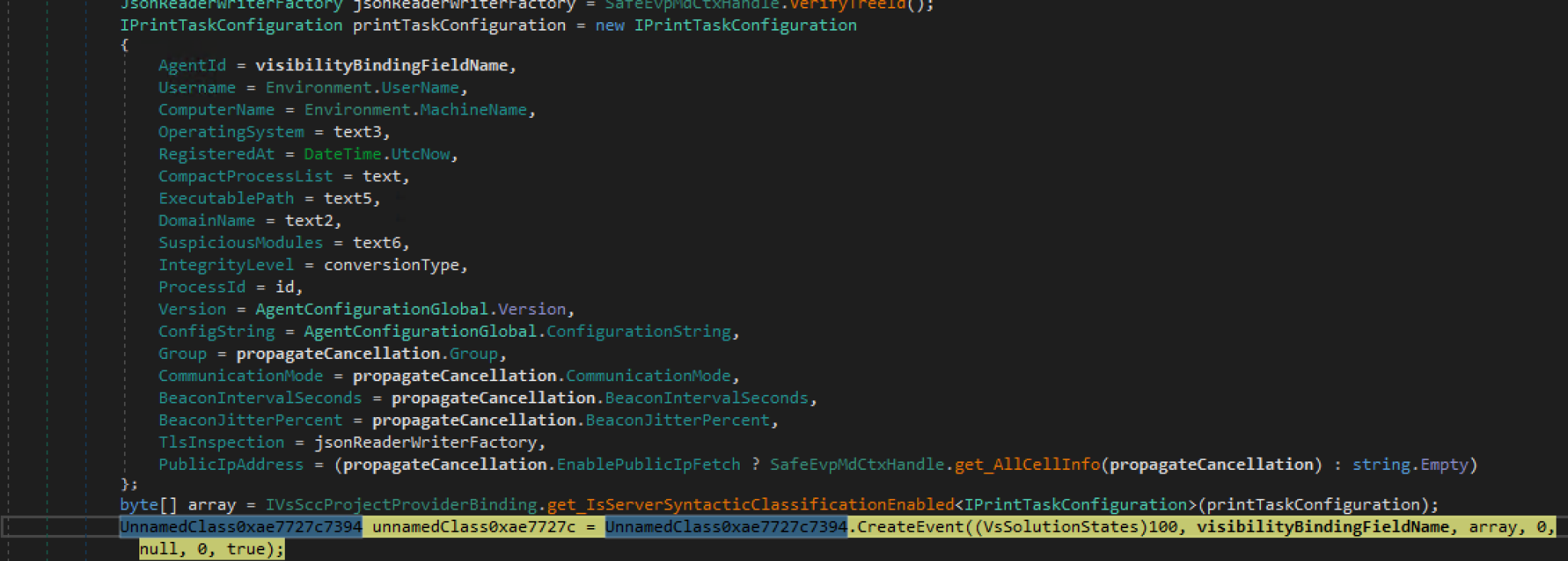
With the UAC COM-based elevation stage complete, Azalea begins execution and prepares to communicate with its C2 infrastructure. It gathers extensive host, process, and configuration information, including the agent ID, username, computer name, operating-system version, running processes, executable path, process ID, integrity level, malware version, communication settings, TLS-interception status, and public IP address, among other details. The collected data is then serialized for transmission over the configured TLS-protected TCP channel.
Incoming C2 Message Format
After completing the initial registration, Azalea keeps the TLS-over-TCP connection open and waits for instructions from the C2 server. Each incoming message contains a protocol header followed by an optional payload. The header includes Flags, MessageType, DataTypeValue, PayloadLength, AgentId, TaskId, ChannelId, PluginId, SourceAgentId, and Checksum.
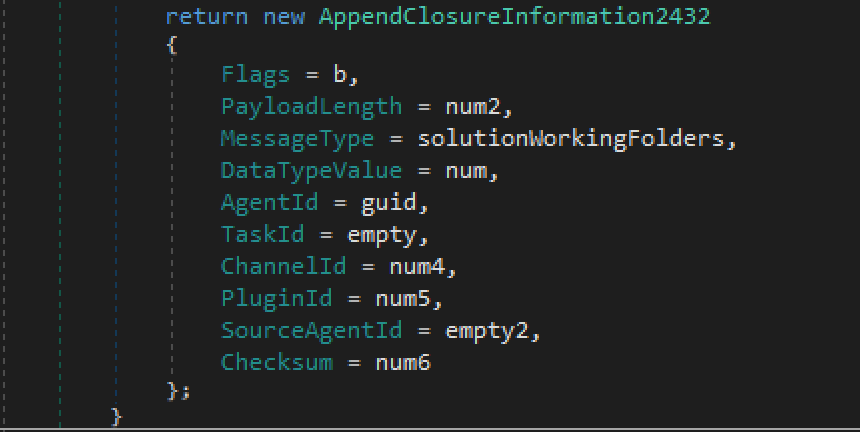
After validating the header, Azalea reads the number of bytes specified by PayloadLength and decompresses the payload when the compression flag is present. For command messages, the internal router uses DataTypeValue as the command identifier, locates the corresponding registered handler, and executes the requested command on the victim’s machine.
Command-and-Control Functions Supported by the Agent
Azalea implements a comprehensive post-compromise command framework combining conventional remote-access functionality with several specialized capabilities.
Its standard functions include keylogging, clipboard monitoring, process and Registry manipulation, filesystem access, payload execution, persistence, screen streaming, and data exfiltration. More distinctive capabilities include support for keyword-based Windows Event Log filtering, Active Directory object discovery and modification,HVNC, installation of mouse-driver package, transacted process hollowing, DLL injection, token impersonation, and UAC bypass.
The following table presents the complete set of identified command IDs and their corresponding validated descriptions.
| Command ID | Description |
|---|---|
| 7000 | Start keylogger |
| 7001 | Stop keylogger |
| 9400 | Enumerate local Windows user accounts |
| 9401 | Enumerate local groups, or members of a specified group |
| 9402 | Collect current process token security context |
| 9403 | Build 24-hour active-hours histogram |
| 5000 | Enumerate processes with rich metadata and icons |
| 5002 | Terminate process by PID or process name |
| 5003 | Suspend a process |
| 5004 | Resume a suspended process |
| 8250 | Download and execute payload from URL |
| 8251 | Execute uploaded payload bytes |
| 8252 | Download a payload and execute it using transacted process hollowing |
| 8253 | Run supplied payload bytes via transacted process hollowing |
| 6000 | List registry subkeys |
| 6002 | List registry values and data |
| 6004 | Create registry key |
| 6006 | Create/set registry value |
| 6008 | Update/overwrite registry value |
| 6010 | Delete registry key |
| 6012 | Delete registry value |
| 6016 | Rename registry value |
| 9300 | Inject an operator-supplied Event Log filtering hook DLL |
| 9301 | Get Event Log hook/filter status |
| 9302 | Add Event Log filter keyword |
| 9304 | Remove Event Log filter keyword |
| 9303 | Unimplemented Event Log command |
| 10000 | Enumerate monitors with JPEG previews and capture capabilities |
| 10002 | Start desktop screen streaming |
| 10003 | Stop desktop screen streaming |
| 9204 | Attempt ICMLuaUtil UAC bypass and launch target elevated |
| 14000 | Show or hide the Windows taskbar |
| 14001 | Show or hide desktop windows |
| 14002 | Open a website in the default browser |
| 14003 | Enable or disable Task Manager |
| 7100 | Start clipboard monitoring |
| 7101 | Stop clipboard monitoring |
| 7200 | Start cryptocurrency-address clipboard replacement monitor |
| 7201 | Stop cryptocurrency clipper |
| 7202 | Get crypto-clipper status |
| 8001 | Start performance monitoring |
| 8002 | Stop performance monitoring |
| 8003 | Get performance-monitor status |
| 17000 | Enumerate/search Active Directory objects |
| 17001 | List children of an Active Directory object |
| 17002 | Retrieve attributes of an Active Directory object |
| 17003 | Create AD object |
| 17004 | Delete an Active Directory object |
| 17005 | Add an object to an AD group |
| 4002 | List drives or directory contents |
| 4015 | Get current working directory for the agent session |
| 4016 | Set current working directory |
| 4017 | List current or specified directory |
| 4009 | Delete file or directory recursively |
| 4011 | Rename file or directory |
| 4012 | Copy file or directory |
| 4013 | Move file or directory |
| 4010 | Execute file with arguments |
| 4004 | Exfiltrate a file to the C2 server |
| 4014 | Preview a file |
| 8100 | Collect filesystem navigation locations |
| 4300 | Bulk file/directory transfer to controller |
| 11005 | Enumerate HVNC desktops with PNG previews |
| 11007 | Create an HVNC desktop |
| 11002 | Start application/process on HVNC desktop |
| 11008 | Start HVNC screen/control stream |
| 11009 | Stop HVNC stream |
| 11010 | Enumerate windows on an HVNC desktop |
| 11015 | List supported HVNC applications |
| 13000 | Display a message box |
| 9500 | Duplicate and impersonate a process access token |
| 9501 | Revert token impersonation to self |
| 9700 | Create or remove Task Scheduler persistence |
| 9701 | Create or remove Registry Run persistence |
| 9702 | Create or remove Explorer Policies Run persistence |
| 9703 | Create or remove Registry-staged persistence |
| 202 | Switch C2 communication mode |
| 203 | Set HTTP beacon interval and jitter |
| 205 | Configure HTTP burst mode/rate limits |
| 204 | Sleep once, then reconnect |
| 206 | Deploy and launch a replacement agent |
| 12006 | Enumerate supported applications and their desktop status. |
| 12010 | Installs HID mouse driver |
| 12007 | Inject supplied DLL into selected 64-bit processes |
The forum advertisement shared by DarkWebInformer promotes Azalea as a feature-rich RAT with Active Directory interaction and keyword-based Windows Event Log evasion. Our reverse engineering partially corroborates these claims.
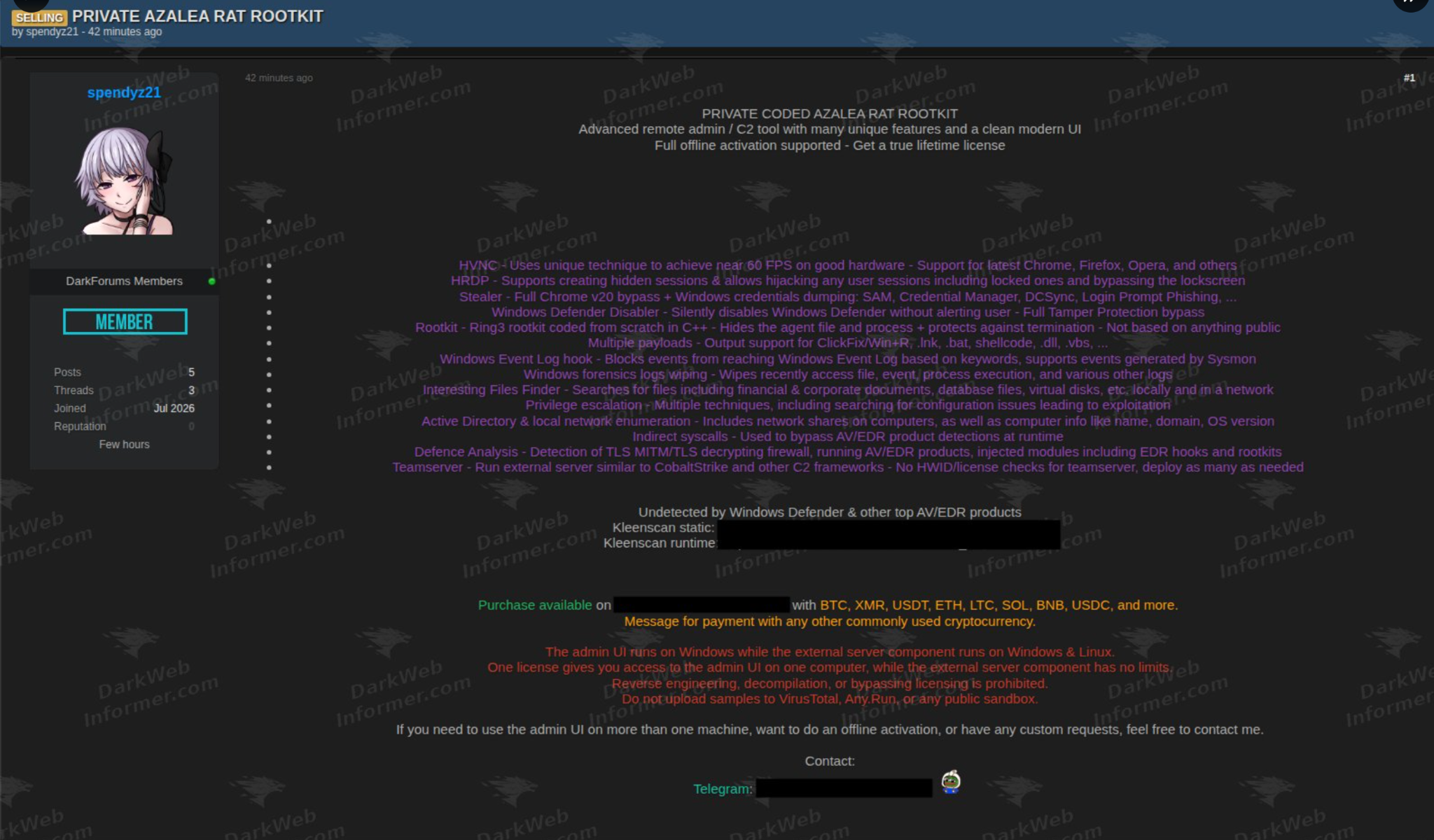
Commands 17000–17005 allow the operator to search and inspect Active Directory objects, create or delete directory objects, and modify group membership. These functions could support domain reconnaissance, persistence, and privilege escalation when the compromised security context has sufficient Active Directory permissions.
Separately, commands 9300–9304 manage an Event Log filtering subsystem that supports hook deployment, status checks, and keyword management. According to the seller, events containing configured keywords—including Sysmon-generated events—are prevented from reaching Windows Event Log.
The analyzed agent contains the code required to deploy and control this DLL, but the DLL itself was unavailable, preventing independent validation of the hooked APIs, filtering stage, and exact suppression behavior.
Modular Plugin Execution
Azalea uses numeric Plugin IDs to identify and execute different plugin modules. In the analyzed build, these plugins are expected to be stored as embedded resources within the agent when included. Four Plugin IDs were identified: Stealer (ID 5), Remote Injector (ID 19), AntivirusKiller (ID 22), and Miner (ID 26). Only the Stealer plugin resource is present in this payload. The code paths for the Remote Injector, AntivirusKiller, and Miner plugins are present, but their corresponding embedded resources are not included.
The stealer plugin targets Chromium-based browsers to extract saved passwords, cookies, payment card information, browsing history, downloads, bookmarks, and autofill data. It also supports collection of system, hardware, software, and network information, while including application-specific modules for Discord, Telegram, Steam, FileZilla, MobaXterm, RDCMan, Thunderbird, and Foxmail. The collected data is organized into structured reports and archives before being returned to the main Azalea agent for exfiltration.
Conclusion
Azalea demonstrates a well-engineered and modular malware framework designed to support the complete post-compromise lifecycle. Rather than relying on a single capability, it combines stealth, privilege escalation, in-memory execution, persistence, comprehensive system reconnaissance, and extensible plugin-based functionality into a unified platform. This modular design allows operators to selectively deploy capabilities based on operational objectives, making Azalea adaptable across diverse intrusion scenarios. Its emphasis on evasion, operational flexibility, and extensibility highlights an evolving trend toward malware frameworks that can efficiently support long-term access, intelligence collection, and follow-on operations.
Indicators Of Compromise (IOCs)
All of the IOCs are available in RZL threat feed for detection in Rubrik products.
File indicators
| пропозиція.pdf.lnk | c8a64b664e9c1d50570b0c36eb05aa9b089b72c9ef452cbe1c867f7d9dd97396 |
|---|---|
| First Stage Payload | fb4705291d43caa98aab2d0c8a9f9e43d4828f4190c125624e076e20aa83d911 |
| Second Stage Payload | 3b150a9d462db8008e53401a87858e8837094dce60838b974018b36d3839383d |
| Azalea RAT | 1e5b9e99c5cb2abcd77ea25c29a01eb419231445ae8f525c8339bfd590c9445e |
| Azalea RAT - Additional Samples | 8c1aa18255eaf5af7970b08d5744bb6d5ffc849292855a51791a5ff5d3577e60 a0e046a4bdcdac893339cfe7284529734733fcbc89fcc6cf3f9ff5c6e8dcc69d af7d42a4c6e034d1631336bae5249d3a419168a7ae5909266ab5ca428e9cd21a 5a3c1fd4f30b17f3646df47f1a452731f24bc99557fd284d0901fd6db8214b51 4eab989c3b70f67d2c6ea1b6b69223b91ed83477ab977f256ed3171b17e8ed3a 72fbdd7c6b1232436418baf150f35a938f96175a9481a66ab3fd09e4fed32e23 969f20ae5263e39aa325f1db426e450d0e9cb640739e7bfedde4db5510c677e4 7906b46976cb06e53c9e197b19508de6663f627149fd51c37a0fb516285392b2 38ebb530958781d7a8741f78246d01ca6071ed0e2004923a6cb8f56e7f569814 23ba1d74640db046a3340dba4cb50278d1447e30ae8f6f76c7dbac38c19487dd 6e3a5404a187158b61ac563cbf1a3029a9a29b410fdb5a00c18bc81f1cd1e818 b481528041e79ceeb05b3d8f5c379a9ea577716b35892a3cde3d4ae1da0edfd8 |
Network Indicators
| hxxp://159.100.18.98:80/fbbef44e-51f2-4f0c-be82-09a32ddbb320 |
|---|
| hxxps://13.57.6.116:443/babe8d03-0088-4c34-b80d-6dc46f139d36 |
YARA RULE
rule rbrk_Azalea_RAT
{
meta:
description = "Detects Azalea RAT based on internal plugin resource accessor names"
author = "Rubrik Zero Labs"
malware = "Azalea RAT"
date = "2026-07-31"
strings:
$s1 = "get_AntivirusKillerCommandResourceName" ascii wide
$s2 = "get_RemoteInjectCommandResourceName" ascii wide
$s4 = "get_EventlogHookResourceName" ascii wide
$s6 = "get_AntivirusKillerResourceName" ascii wide
$s8 = "get_RemoteInjectResourceName" ascii wide
condition:
uint16(0) == 0x5A4D and
all of them
}
MITRE ATT&CK Mapping
| Tactic | Technique ID | Technique Name |
|---|---|---|
| Execution | T1204.002 | User Execution: Malicious File |
| Command and Control | T1105 | Ingress Tool Transfer |
| Stealth | T1140 | Deobfuscate/Decode Files or Information |
| Stealth | T1620 | Reflective Code Loading |
| Stealth / Privilege Escalation | T1055.012 | Process Injection: Process Hollowing |
| Privilege Escalation | T1548.002 | Abuse Elevation Control Mechanism: Bypass User Account Control |
| Persistence | T1547.001 | Boot or Logon Autostart Execution: Registry Run Keys / Startup Folder |
| Persistence | T1053.005 | Scheduled Task/Job: Scheduled Task |
| Stealth / Discovery | T1497.001 | Virtualization/Sandbox Evasion: System Checks |
| Defense Impairment | T1685 | Disable or Modify Tools |
| Credential Access | T1555.003 | Credentials from Password Stores: Credentials from Web Browsers |
| Exfiltration | T1041 | Exfiltration Over C2 Channel |
LATEST BLOGS