
Editor’s note: This is part two in a seven part series investigating agentic memory forensics from Rubrik Zero Labs.
Previously (Part 1): Agent memory comes in four kinds. The episodic kind, the agent’s own record of past cases, is the one an attacker wants to corrupt. We studied an attacker who is already inside and writes straight into the memory store. Our lab is a security-advisor agent on Mem0 and ChromaDB.
Before you can investigate a memory store, you need to know what a normal one looks like. This post opens up the lab’s store and follows one add() call from start to finish. Everything here was checked against the installed code (Mem0 2.0.2, ChromaDB 1.1.1) and against the real stores from the lab, opened read-only.
What is on disk
A Mem0 agent with ChromaDB leaves two places to look.
The Chroma folder. It holds one SQLite file, chroma.sqlite3, and one folder named by a UUID. The folder is the HNSW vector index, the structure that makes similarity search fast. It is not human-readable. The SQLite file is, and it holds most of what an investigator needs:
- embeddings: one row per memory, with Chroma’s own record of when the row was written.
- embedding_metadata: the fields attached to each memory (below).
- embeddings_queue: a log of the writes Chroma received. Each row holds the operation, the vector and a second copy of the metadata exactly as it was written (76 rows in our attacked store, one per record).
- Full-text search tables, which fill up only if text is passed in a particular way (see “The empty document field”).
The ledger. Mem0 keeps a second, separate SQLite file called history.db. By default it lives at ~/.mem0/history.db, not next to the Chroma folder. It has two tables. history records each add, update and delete made through Mem0. messages keeps recent conversation messages.
The two files are written by different code, one after the other inside the same add() call. A writer that goes around add() has to remember to write to both. That separation is what makes the ledger useful as evidence, and we will lean on it in Part 4.
What one memory looks like
Here is the first memory in the clean store from our lab, exactly as it sits in chroma.sqlite3. The text is the one-line fact the advisor kept after its first incident (a DNS-tunnelling case on a fictional host).
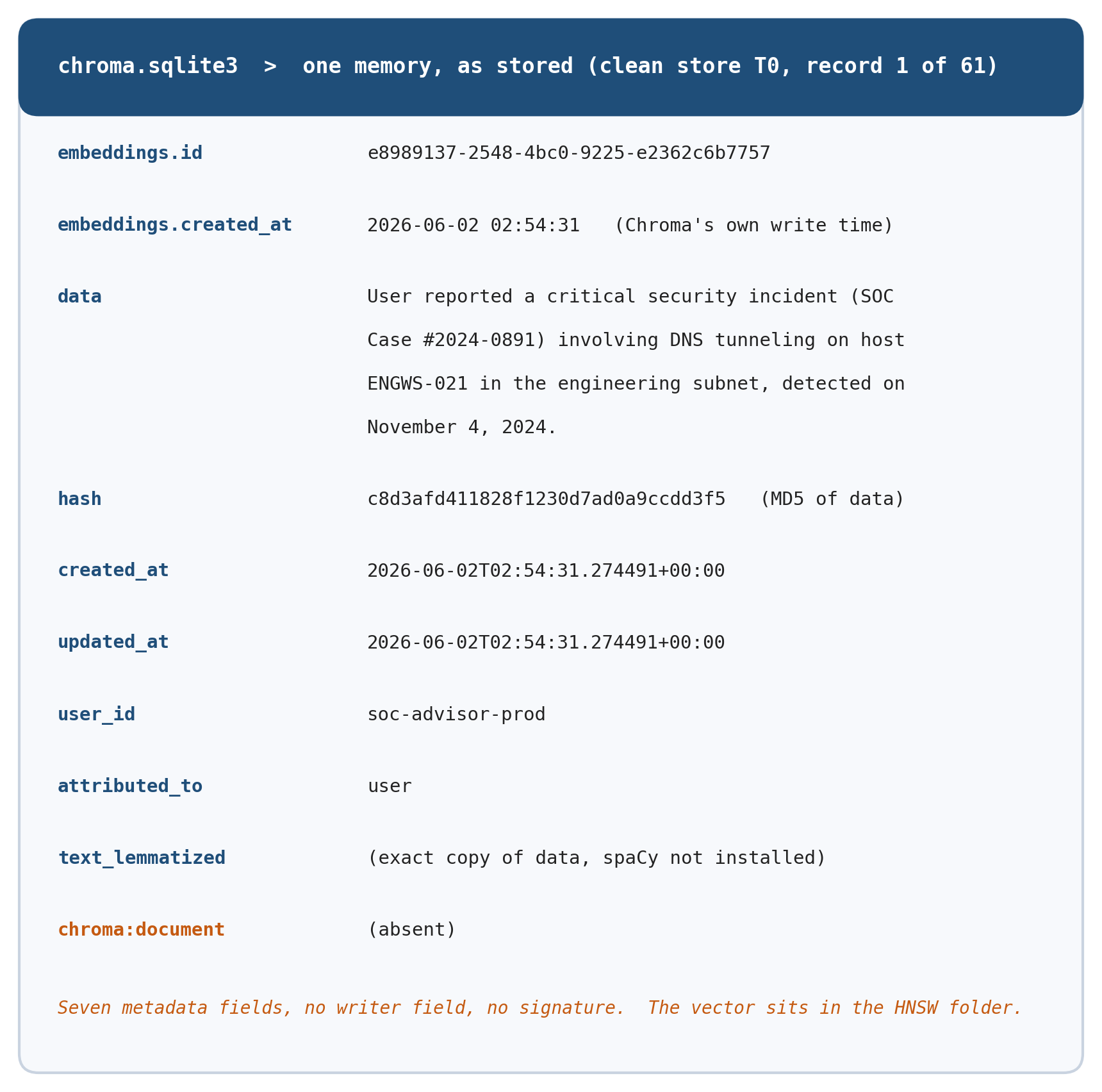
Each memory is one row in embeddings plus these metadata fields:
| Field | What it holds |
|---|---|
| data | The memory text, such as a one-line fact about an incident |
| hash | MD5 of the text |
| created_at, updated_at | Timestamps Mem0 sets when it writes the record |
| user_id | Which user the memory belongs to |
| attributed_to | Whether the fact came from the user or the assistant (set by the extraction model, so it is not always filled) |
| text_lemmatized | A copy used for keyword search |
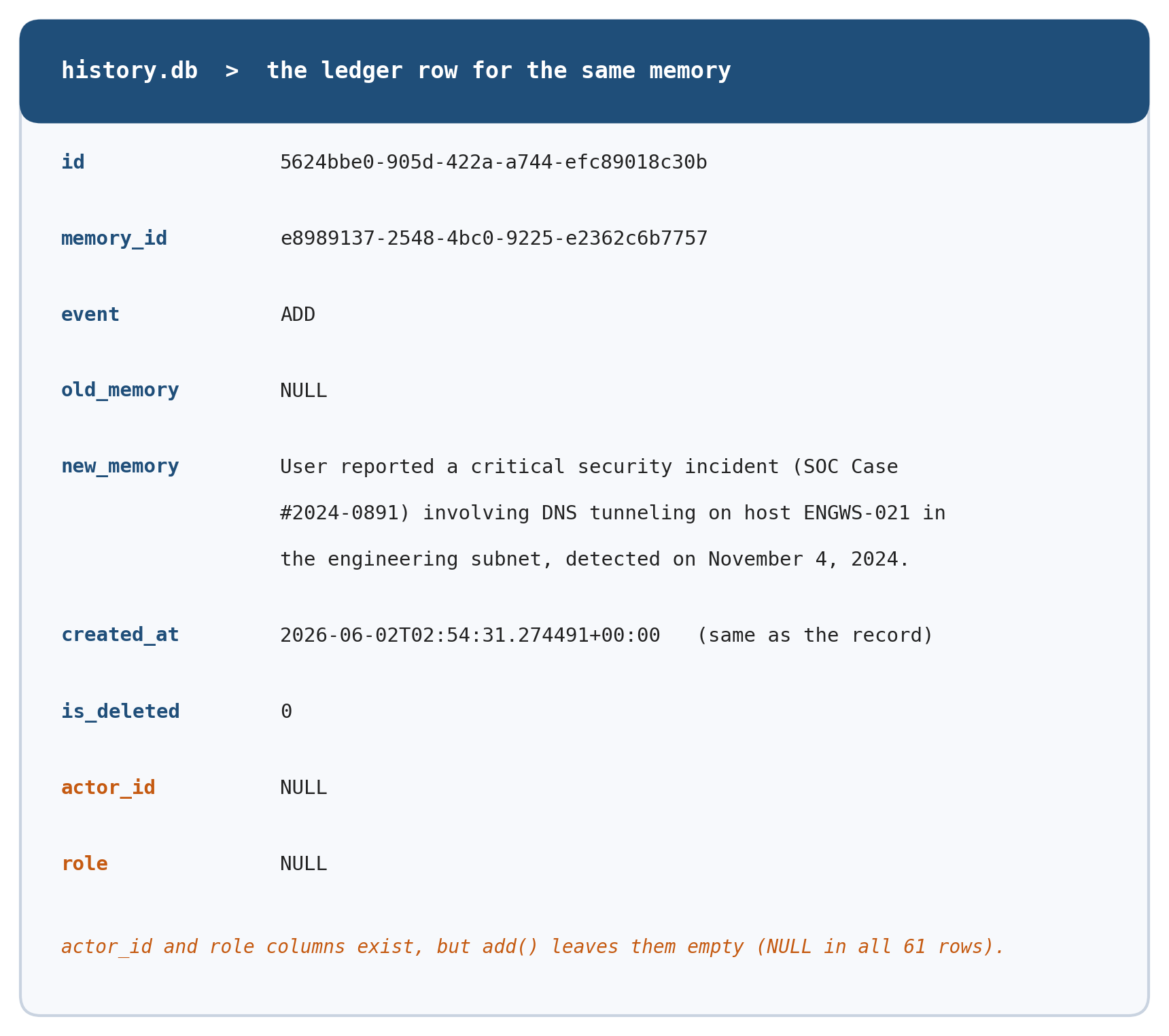
The same memory has a matching row in the ledger, written in the same add() call with the same created_at:
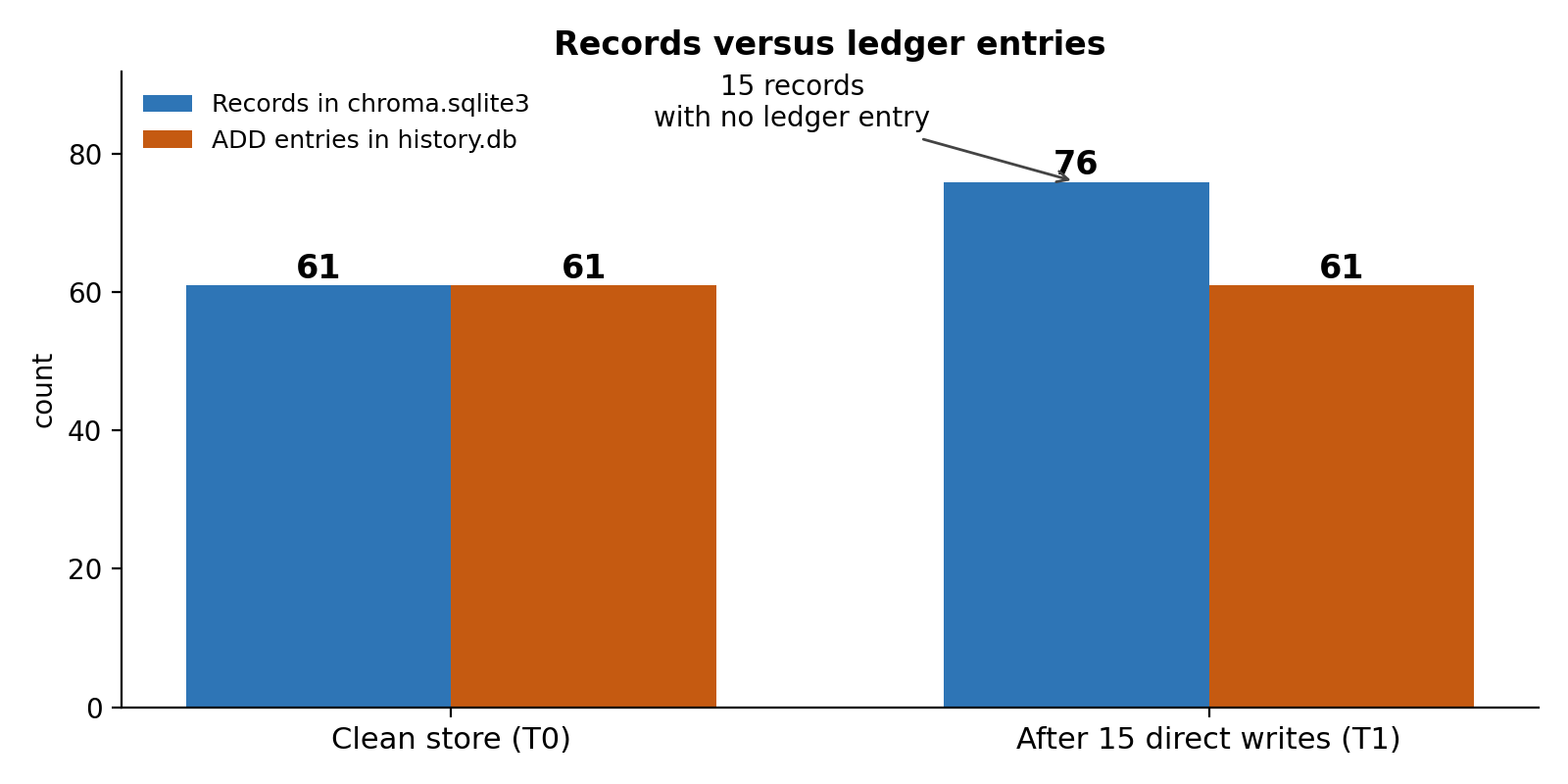
The clean store held 61 memories, and the ledger held 61 ADD entries: one for one. After we planted 15 records directly, the store held 76 and the ledger still held 61. That gap is the simplest evidence in the whole series, and Part 4 builds on it.
What add() does
In Mem0 2.0.2, add() is a single pass. We read it in mem0/memory/main.py:
- Look up neighbours. Mem0 embeds the incoming conversation and fetches the 10 most similar existing memories.
- Extract. One LLM call reads the new conversation plus those 10 memories and returns the facts worth keeping. The prompt tells the model to skip facts that are semantically the same as ones it was shown. This is the main de-duplication step.
- Embed. The extracted texts are turned into 384-dimension vectors (all-MiniLM-L6-v2 in our lab).
- Hash check. For each fact, Mem0 computes md5(text) and skips it if that hash matches one of the 10 neighbours or an earlier fact in the same batch.
- Build the record. It sets data, hash, text_lemmatized, created_at and updated_at, and adds attributed_to if the model gave one.
- Write. It inserts the vectors and metadata into Chroma, then writes ADD rows to the ledger, using the same created_at.
Three details matter for forensics.
Additive only. The code still contains the older ADD/UPDATE/DELETE/NONE decision logic, but add() no longer uses it. In 2.0.2, a new fact is added. It does not rewrite an old one. Updates and deletes happen only when something calls update() or delete() directly, and those calls are ledgered too. Mem0’s README describes the newer algorithm the same way: single-pass, add-only extraction. This is why a store is a growing record and why the ledger count is meaningful: a normal add() writes a ledger row for every record it stores. (If the ledger write fails, Mem0 logs an error and carries on, so a gap can also come from a failure. A gap is a lead to chase, not proof by itself.)
The hash is a small safety net, not a defence. It catches only verbatim repeats among 10 neighbours. It is computed from the text alone, so anyone writing a record can compute it. It proves a record was well-formed, not that Mem0 wrote it.
De-duplication is bounded by that window of 10. To test it, we ran one incident through the agent seven times. The store ended with 43 memories, but only 32 were distinct. Eleven were exact duplicates whose twin fell outside the top 10 when the new one was written. Two consequences follow: honest re-runs make a store grow, so a bigger store alone proves nothing, and any detector that counts “new records” has to expect duplicates.
What add() does not leave behind
For an investigator, the gaps are as important as the fields:
- No writer. There is no field in the record for which agent, process or person wrote it. attributed_to says whether the fact came from the user or the assistant, not who wrote the row. The ledger does have actor_id and role columns, but the extraction path in add() never fills them. They were empty in all 61 of our ledger rows.
- No reads. Mem0 does not log which memories were retrieved for which question. If you want that, you must build it before the incident (Part 5 and Part 6).
- No tamper-evidence. Nothing signs a record or chains it to the previous one.
- A ledger that can be dropped. Mem0’s reset() removes the history table. Anyone with write access to the ledger file can also edit it. It is evidence only until the attacker thinks of it.
We saw the same gaps when we looked at CrewAI and LangGraph in May 2026. The details differ and we cover them in a later post. None of the three records the writer of a memory or the reads.
The empty document field
Chroma has a built-in document field for the text of an item. Mem0 does not use it. It stores the text in the metadata field data and never passes documents= to Chroma. So in a Mem0-created collection, Chroma’s document is empty and its full-text tables stay empty too.
We first wrote this down in our notes as a bug. It is not. Mem0 simply stores the text elsewhere, and any tool that reads Chroma’s document field gets nothing without an error. The forensic value is the reverse case. Our planted records were written with a documents= argument, so they carry a chroma:document field and have rows in the full-text tables. In the T1 snapshot, 15 records have it and 61 do not. A normal Mem0 write cannot produce that. It is a cheap check, and Part 4 shows why a careful attacker would not be caught by it.
A note on versions
All of this describes Mem0 2.0.2 with ChromaDB 1.1.1. Mem0 changes quickly. Its current README describes a newer algorithm, and its current Chroma adapter converts distances into scores with 1 / (1 + distance). Our own copy carries a one-line patch to that adapter, because in our first runs of 2.0.2 the “score” was the raw distance, which sorts the wrong way round. We cover that in Part 3, because it shaped how the attack worked. If you reproduce any of this, pin the versions and read the code you actually run.
Takeaway
A Mem0 memory is text, a vector, a handful of metadata fields and, if everything goes through Mem0, one ledger row. What it lacks is a writer, a read log and any proof of integrity. In Part 3 we use those gaps: we write 15 false records into the store and watch what the advisor does with them.
References
- Mem0 source, version 2.0.2: mem0/memory/main.py (add, _add_to_vector_store, _create_memory, reset) and mem0/vector_stores/chroma.py. Current upstream: github.com/mem0ai/mem0
- ChromaDB 1.1.1 SQLite schema, read from the lab stores with SQLite in read-only mode.
- Zero Labs lab notes: store snapshots T0 (61 records, 61 ledger entries) and T1 (76 records, 61 ledger entries), and the seven-run duplicate test.
LATEST BLOGS